


Booking Platform
National booking platform for Azerbaijan.
TL;DR
- Improved an already-launched booking platform: higher conversion at checkout and clearer flows for guests and hosts.
- Two listing types (hotels vs private) got separate layouts and list patterns so users aren’t confused by one-size-fits-all.
- Checkout: clear payment and cancellation options and explicit refund dates — conversion at that stage went up ~40%.
Context
Seaya is the national booking platform for Azerbaijan (by SeaBreeze). It’s both accommodation booking and an event portal: Baku hosts major events that draw international visitors, so the product had to support “book a place for these dates” and leave room for event promos and, later, event tickets at a special price.
Inventory is mixed: hotels and private properties (houses, apartments). The business needed higher conversion at checkout and simpler host onboarding; I focused on the guest-facing flow and checkout.
Travelers (guests)
Hosts / property owners
My role
Sole designer (visuals, UX, UI, research). I joined after the stack was chosen: Minimal UI on MUI. To move fast, I built a component system and adapted the Minimal style guide. As of November 2024 the product team handed over to the client; not all ideas below were shipped.
Problem
One layout for everything: hotels and private properties have different attributes (star ratings vs property type, room picker vs single unit). A single template for both, like on some big booking sites, was confusing and hid what users need to decide.
Uncertainty at checkout: payment options (full vs partial) and cancellation rules were unclear. Users dropped off because they couldn’t see exactly what they were committing to and until when they could cancel or get a refund.
Search and promos fighting for space: the product is both booking and event portal. The first screen had to support search, event promos, and future ticket upsell without feeling cluttered or pushing search out of reach on mobile.
Key trade-offs
Two layouts vs one: we chose separate patterns for hotels and private listings. More to design and maintain, but clearer mental model and the right info per type. We avoided the “one template, many exceptions” approach that often confuses users.
Sticky search vs more above the fold: we kept the search widget compact and made it sticky on scroll so filters and dates stay one tap away. Trade-off: less “hero” space, but users can refine search without scrolling back up.
Explicit cancellation dates vs shorter checkout: we surfaced exact dates for free cancellation and partial refunds before payment. Slightly longer step, but research showed ~40% better conversion when users had that clarity — worth the extra line.
1. Start page — search and events
The product is both a booking platform and an event portal (Baku attracts large events). We needed to surface “book accommodation for these dates” and leave room for event promos and, later, event tickets at a special price.
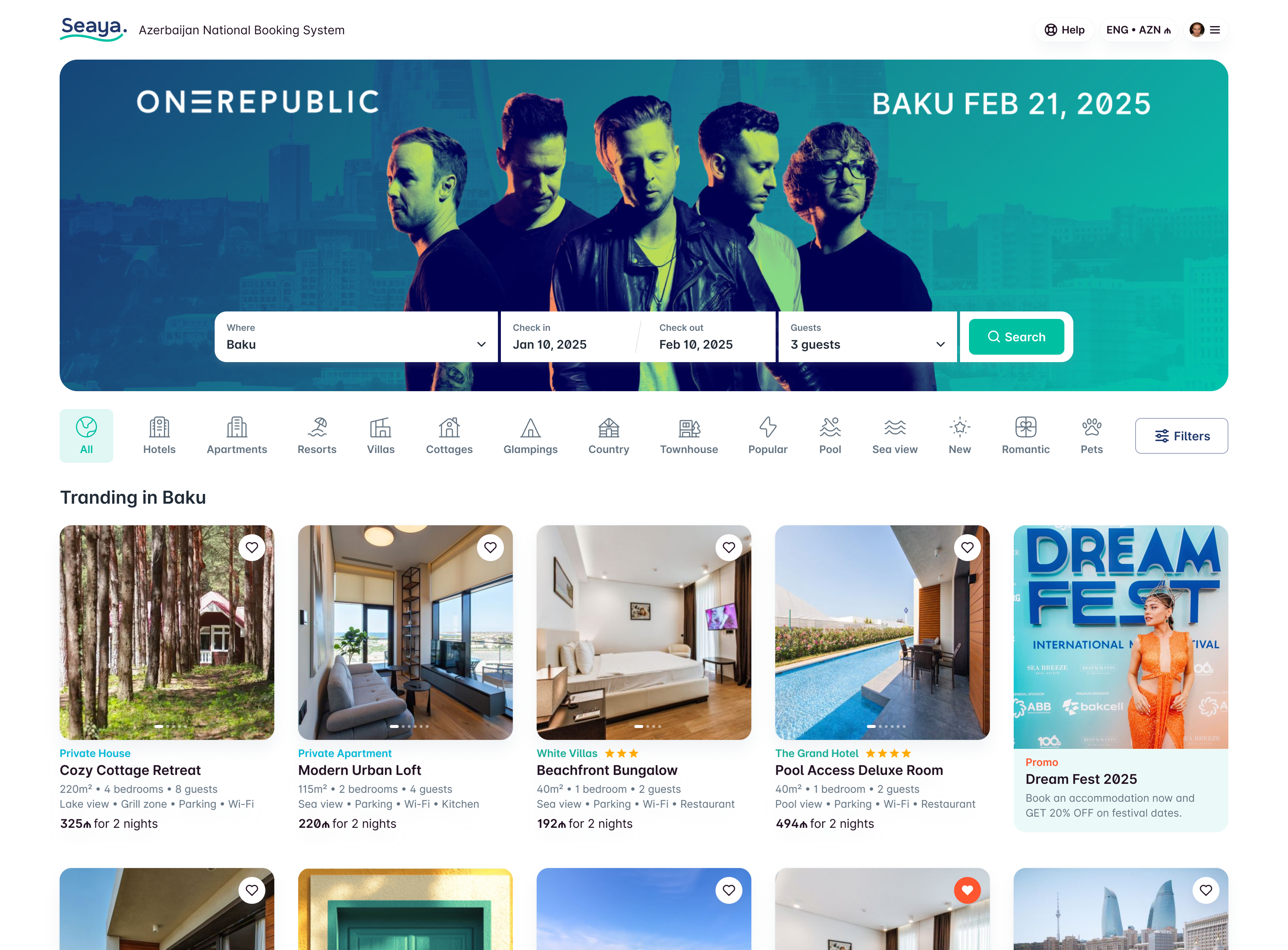
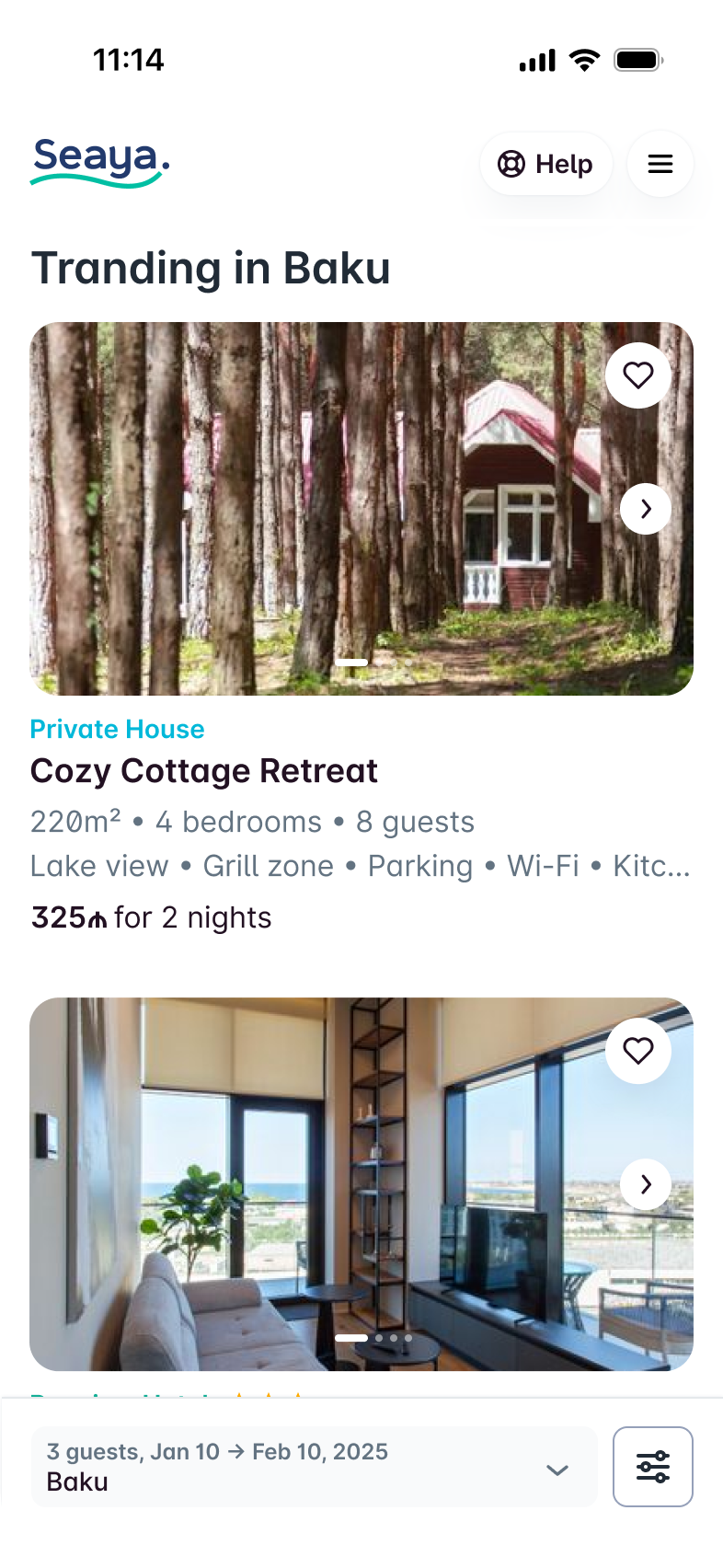
A single search widget with a banner in the middle keeps the first screen focused on one action (search) while giving a dedicated space for promotions. We didn’t want the banner to swallow the whole screen on mobile, so the widget stays compact; on scroll it sticks so search and filters stay within reach. That way the user can change dates or filters without scrolling back up.
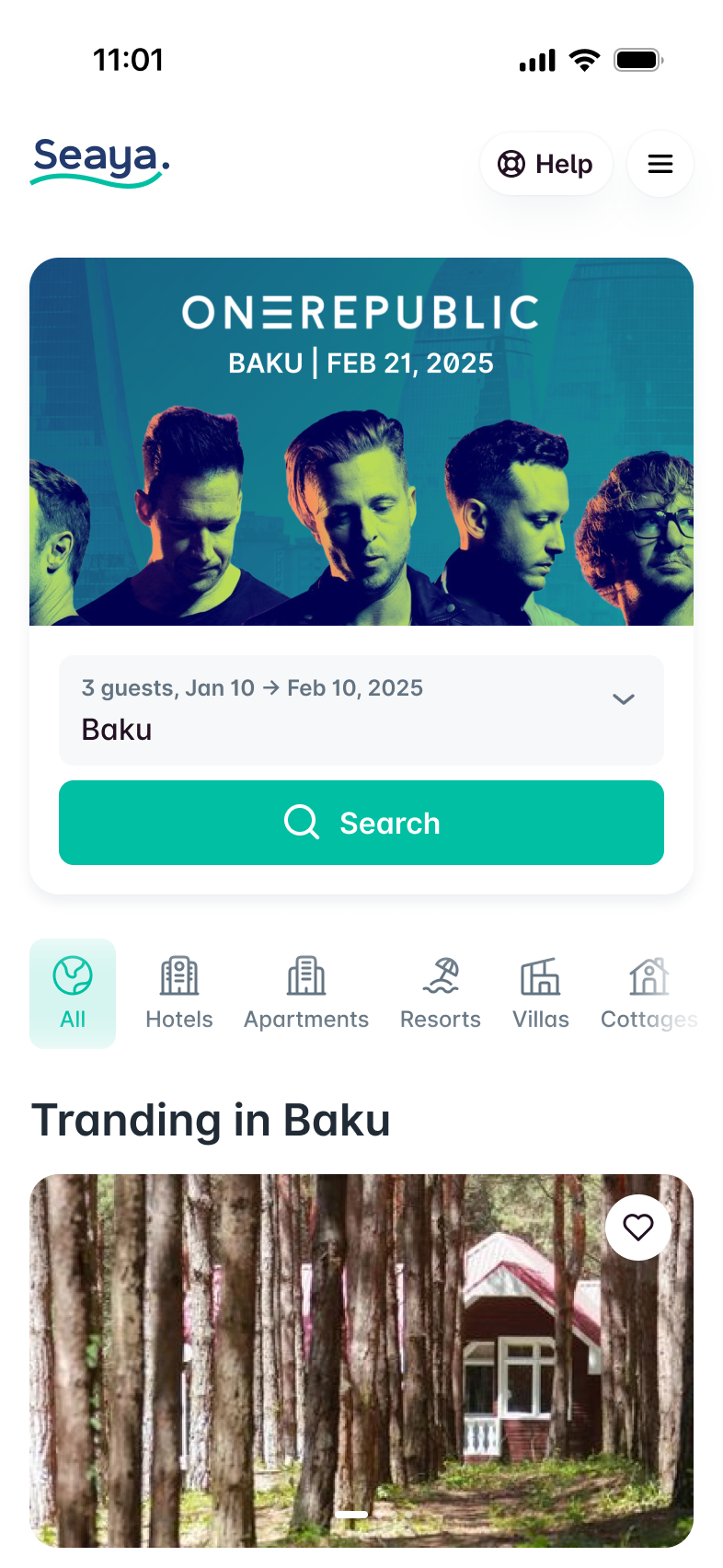
Search widget with event/promo banner.
Widget doesn’t take the full screen.
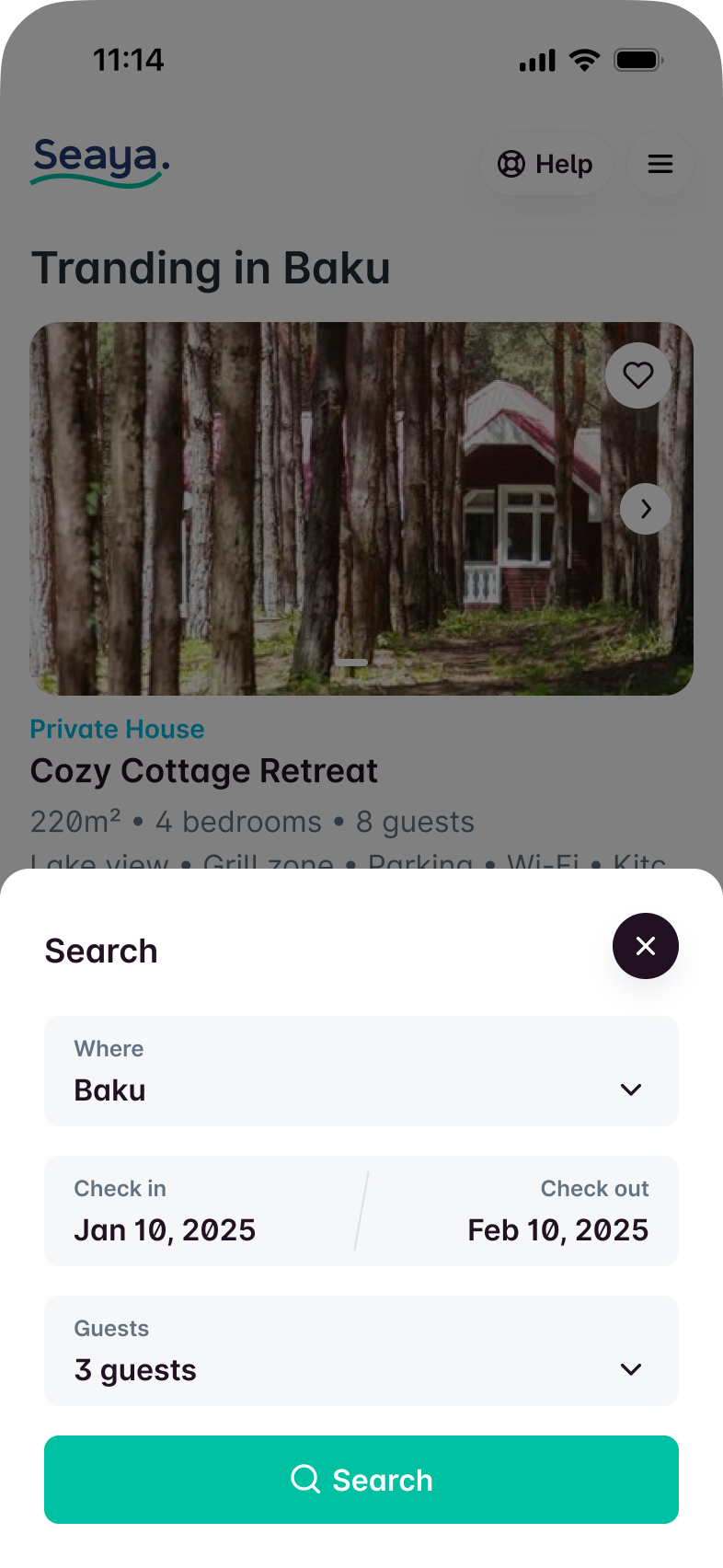
On scroll, search and filters stay accessible.
2. Two listing types — hotels vs private
There are two inventory types: hotels and private properties (houses, apartments). Users need to tell them apart at a glance.
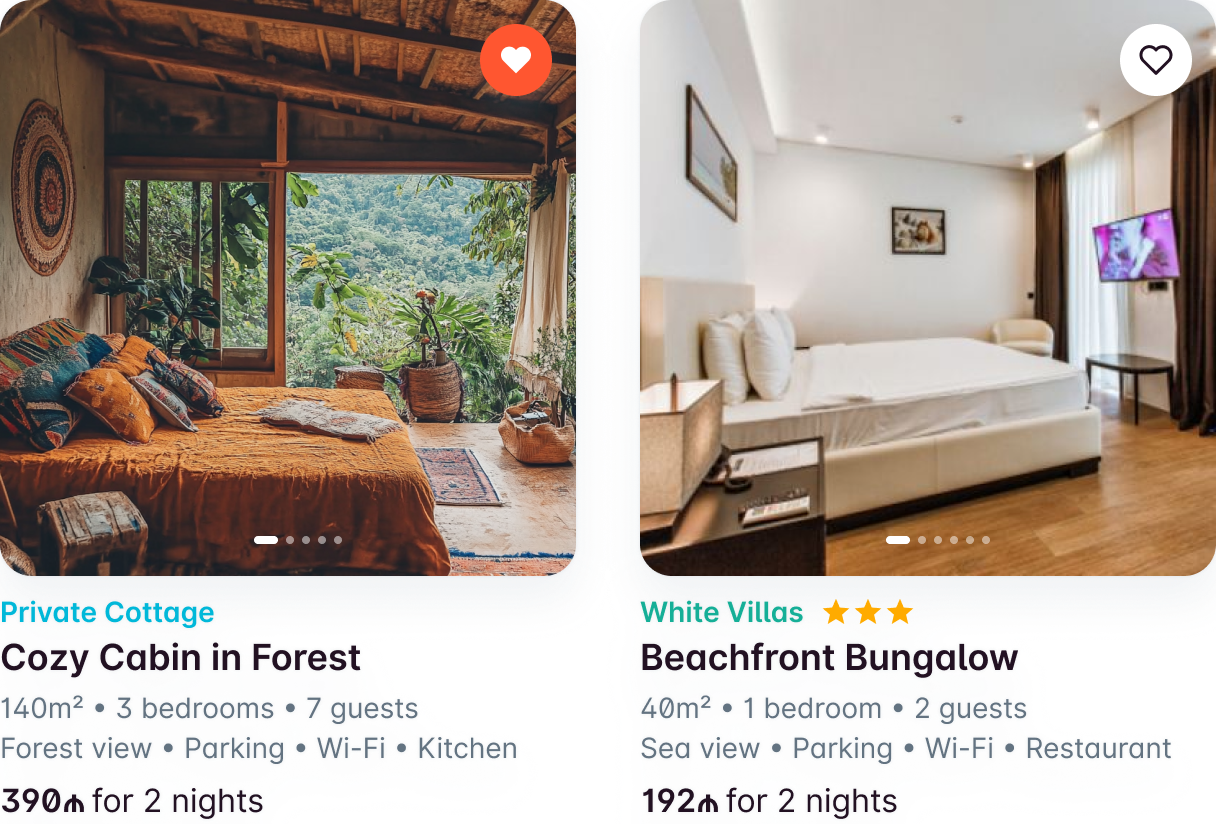
Hotels have star ratings and room types; private listings don’t have stars but do have property type (house, cottage, etc.). So in the list we show different attributes: stars for hotels, property type for private. One unified card for both would blur that distinction and add cognitive load.
3. Property details — two layouts, not one
Booking.com uses one layout for hotels and later added private, which often confuses users. We chose two clear patterns instead.
Case 1. Hotels.
Hotels have amenities, services, and room stock (room classes, in-room amenities). The user needs to pick a room. So the page is built around: choose nights/guests, then choose a room. The cheapest room is pre-selected so the user can complete quickly or change if they want more.
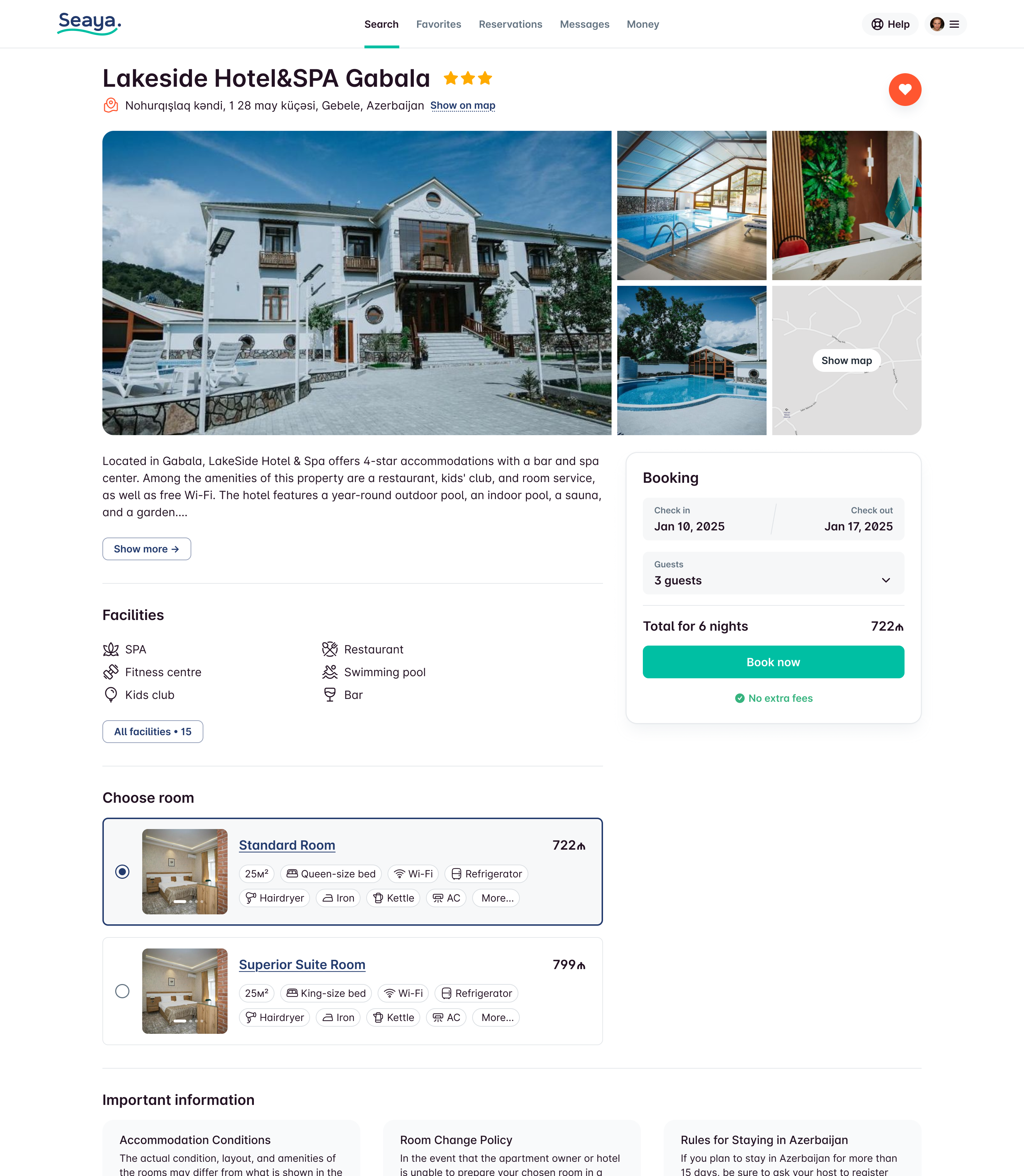
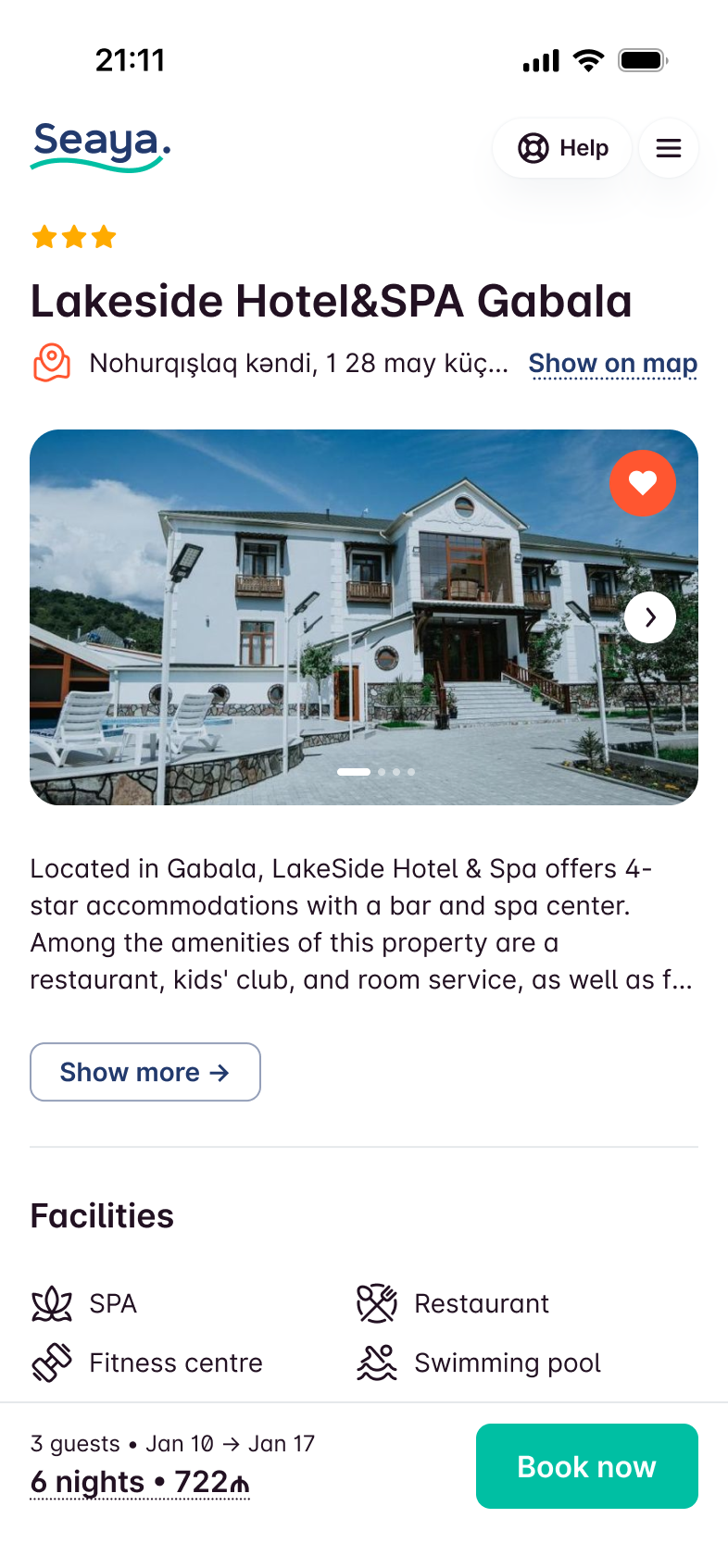
You’ve got everything you need right on your phone: easily adjust the number of nights or guests whenever you want. The cheapest room is picked by default.
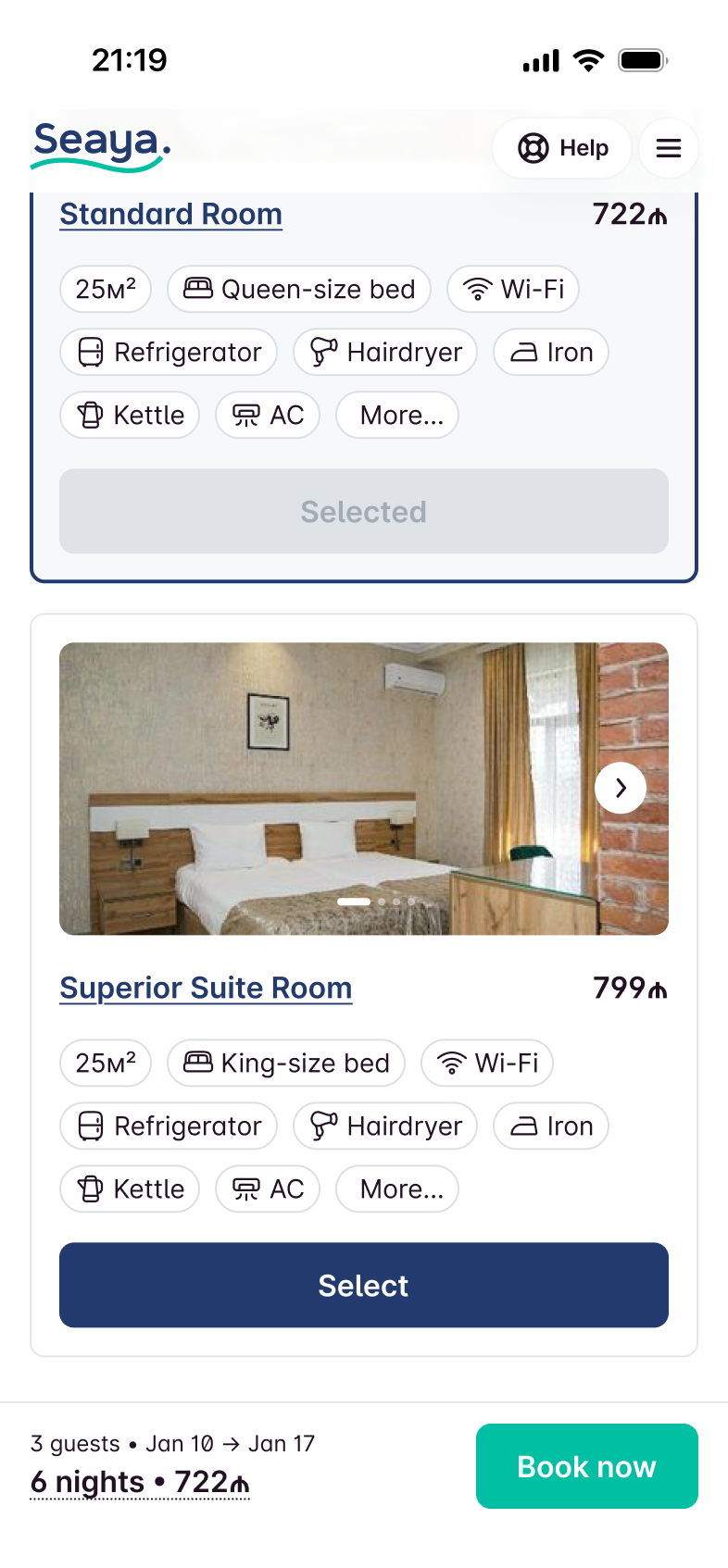
The only thing that’s different from the web version is the Select buttons, which make it super easy to pick your room without diving into the details.
Case 2. Private properties.
For private listings what matters first is location, capacity, amenities, and house rules. There’s no “room picker” — it’s one unit. So the layout prioritises photos, location, and key info on the first screen; house rules in one scroll so nothing is hidden in tabs.
We didn’t have scoring or reviews yet, so we skipped the owner block until we could support trust signals. We still collected data for future reviews.
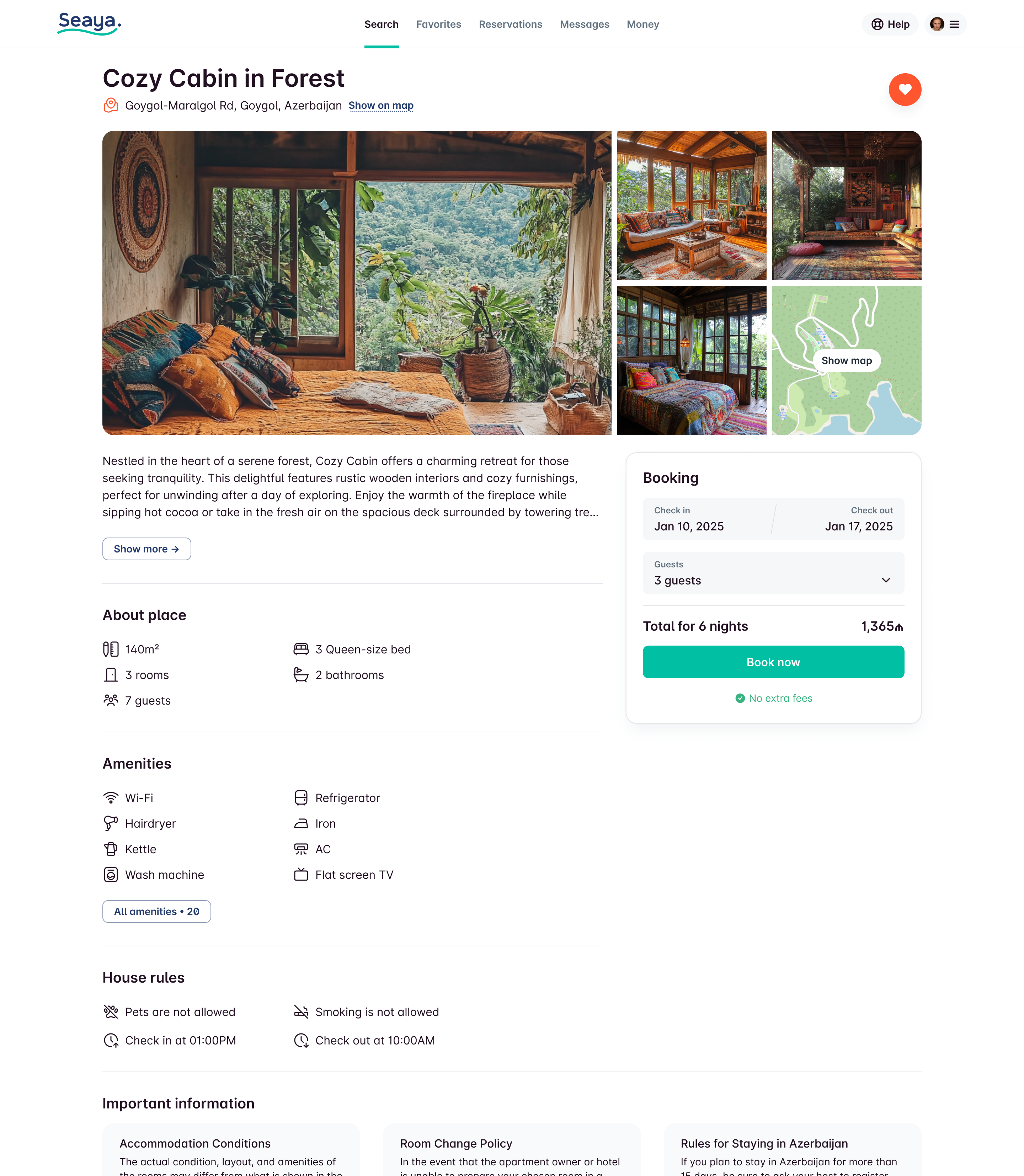
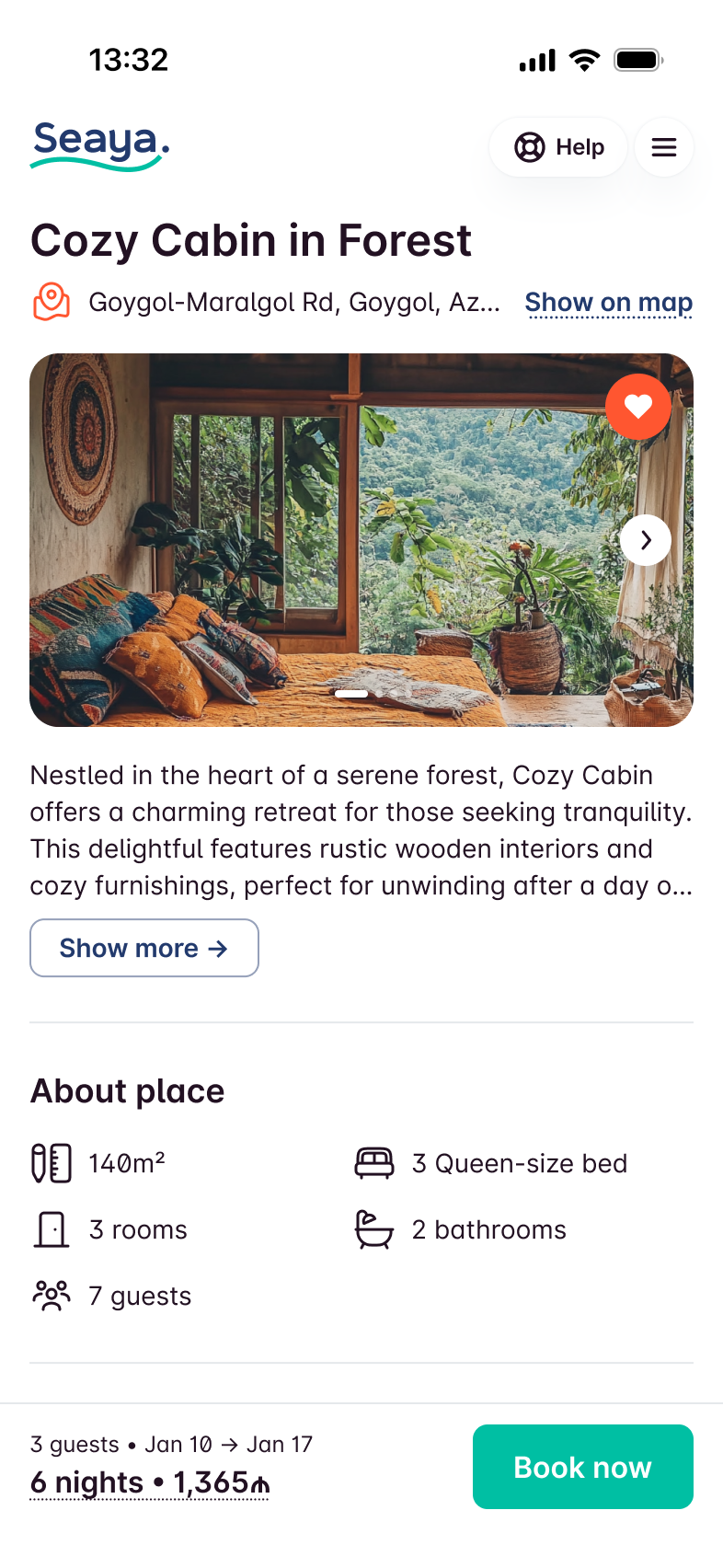
The first screen has all the good stuff: photos, where it’s at, and housing info.
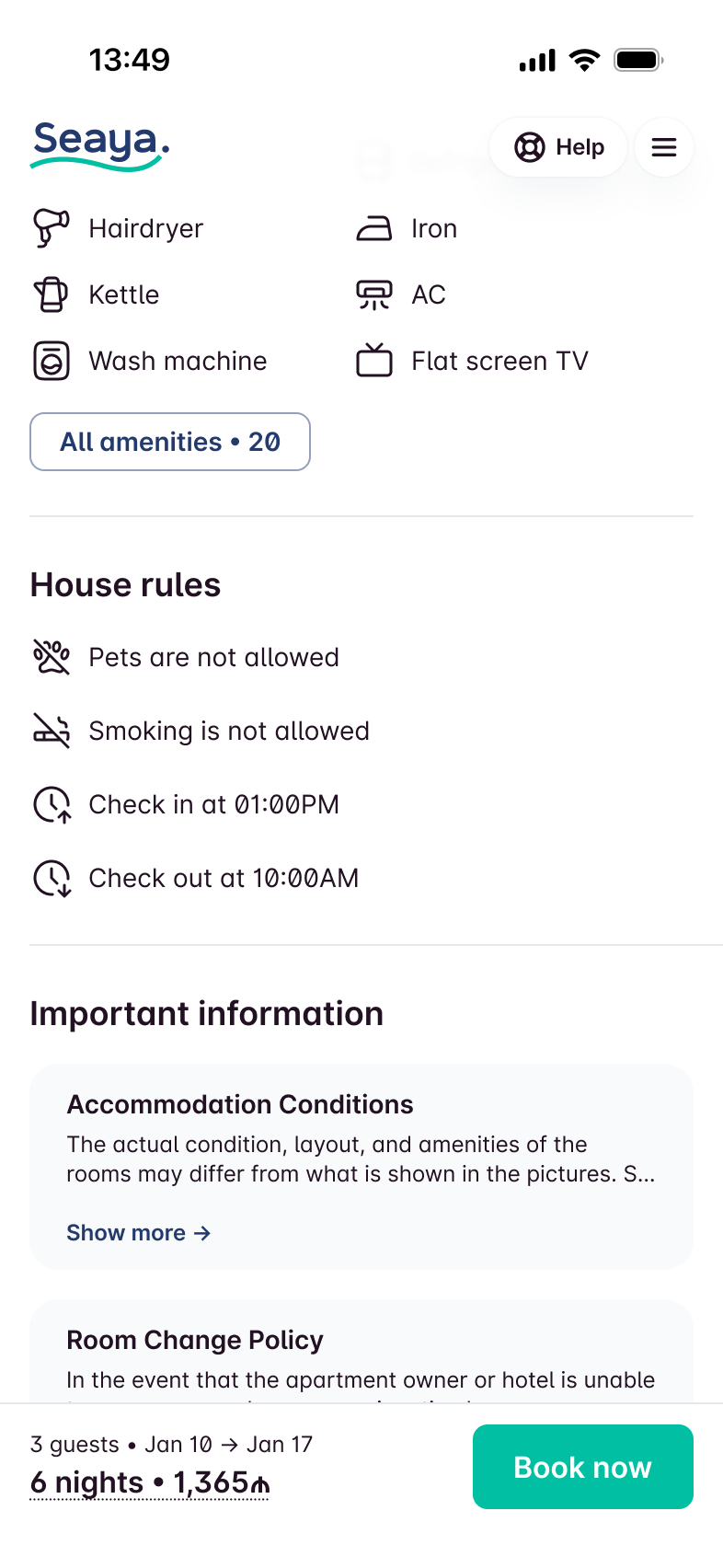
You can see the house rules all in one scroll, so you won't miss a thing!
4. Checkout — payment options and cancellation
Besides standard checkout fields, we let the user choose: pay in full or not, free cancellation or not, and see the price difference. Then we send them to a third-party payment provider with a 30-minute window to complete.
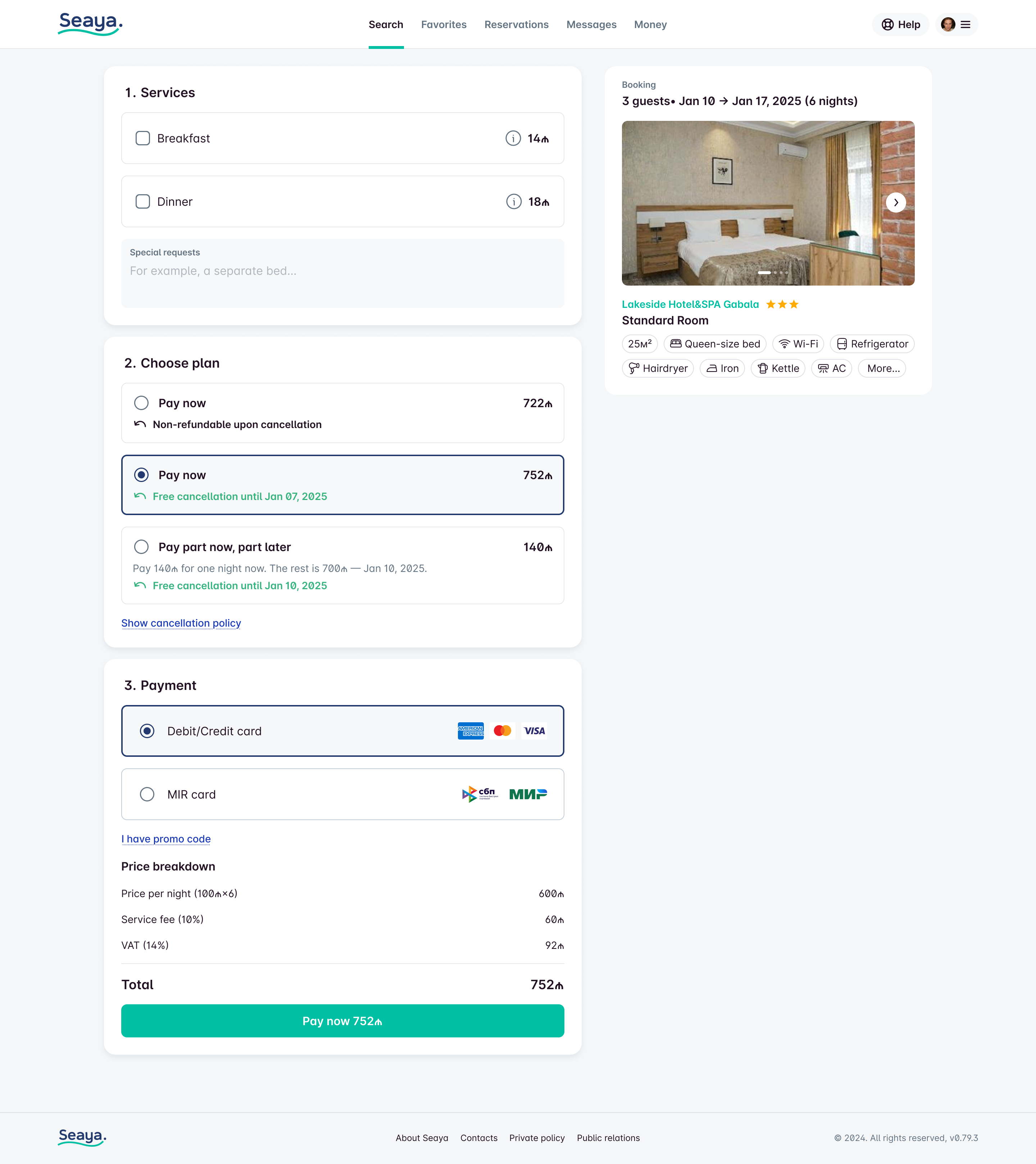
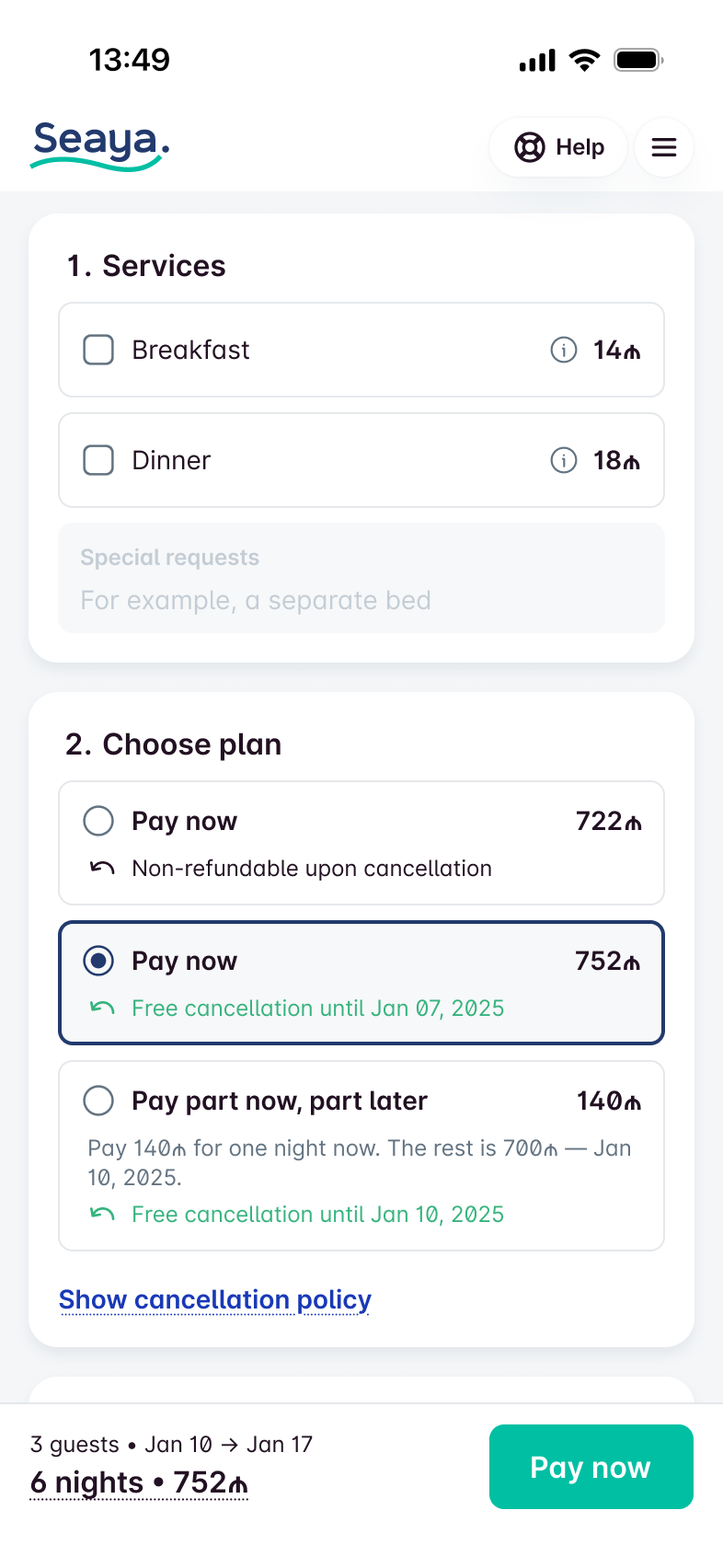
Here I use radio cards to select options, as there are no interactive elements within the card in this case.
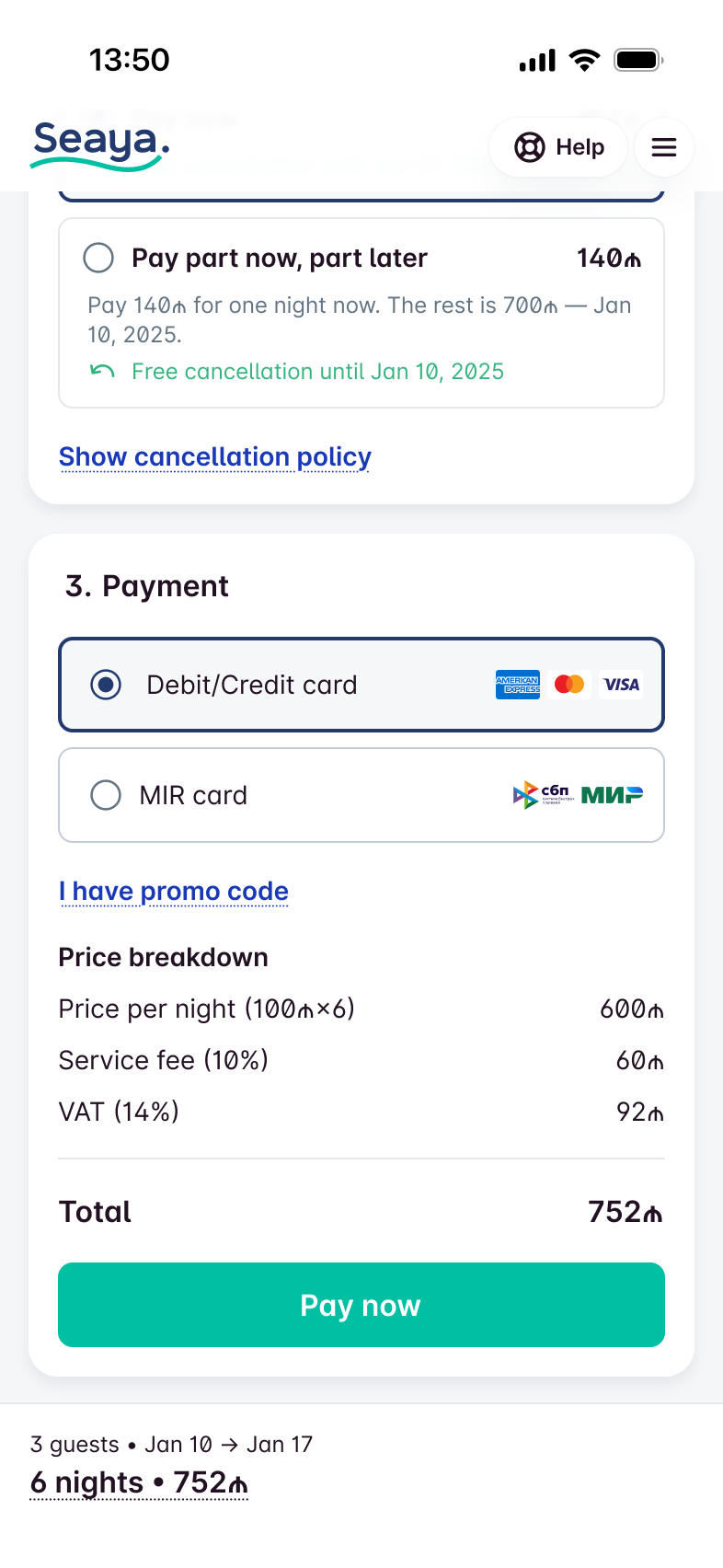
Before payment, the user still has the option to change the number of people and dates.
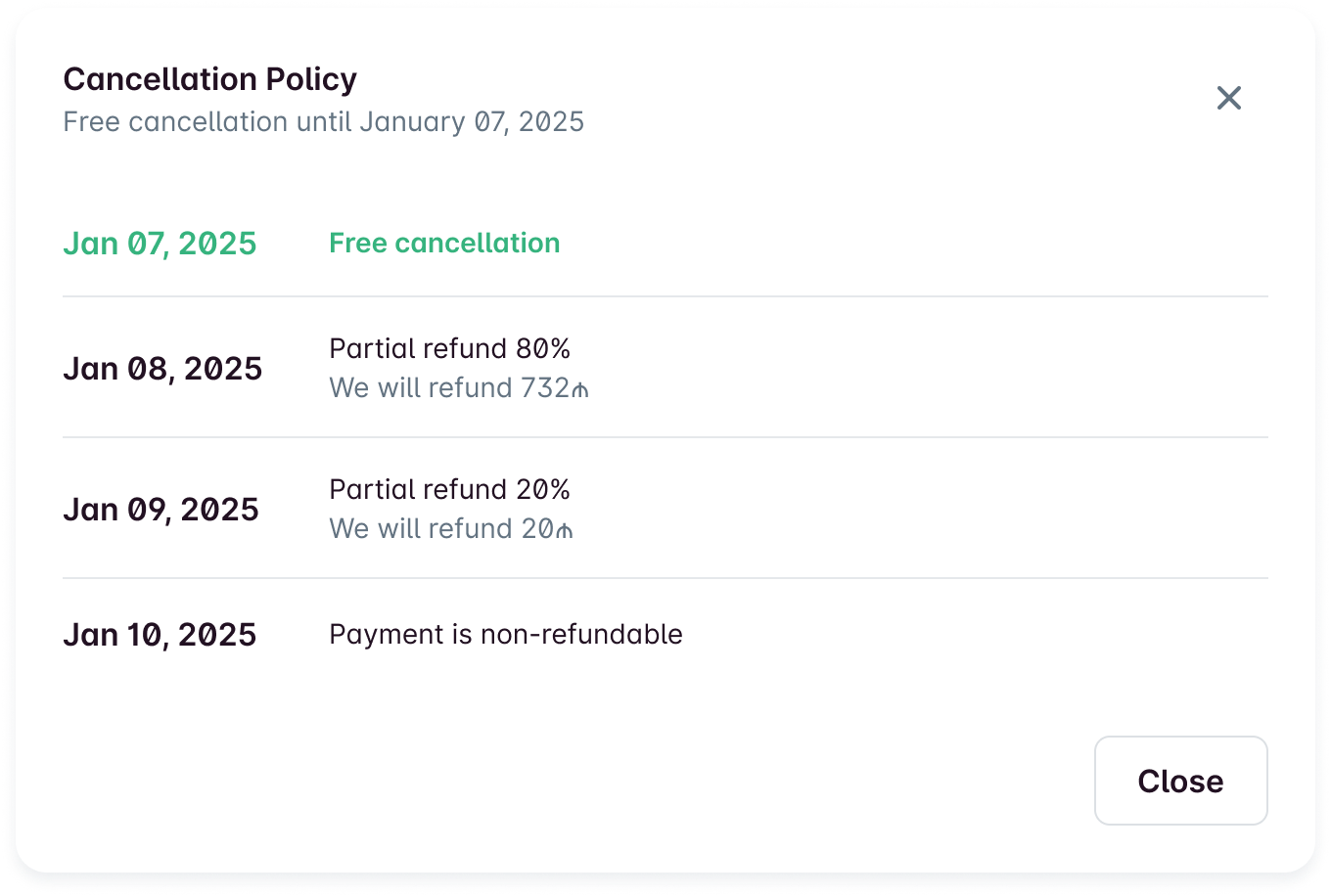
Research showed that when users see exactly until when they can cancel or get a partial refund, they commit more often. At this step we saw about 40% higher conversion when those dates were explicit.
5. Outcomes
Separating hotels and private listings, optimising the mobile flow, and clarifying payment and cancellation led to a more predictable booking path.
The platform became self-sustaining within a year. T
he design system and component approach allowed the client to continue development on their own after the product team stepped back.
1Y
We became self-sustaining after 1 year from the start of development.
+31%
Payment success (payment options and cancellation clarity).
+60%
Bookings from mobile (mobile-first layout and sticky search).

Booking Platform
National booking platform for Azerbaijan.
TL;DR
- Improved an already-launched booking platform: higher conversion at checkout and clearer flows for guests and hosts.
- Two listing types (hotels vs private) got separate layouts and list patterns so users aren’t confused by one-size-fits-all.
- Checkout: clear payment and cancellation options and explicit refund dates — conversion at that stage went up ~40%.
Context
Seaya is the national booking platform for Azerbaijan (by SeaBreeze). It’s both accommodation booking and an event portal: Baku hosts major events that draw international visitors, so the product had to support “book a place for these dates” and leave room for event promos and, later, event tickets at a special price.
Inventory is mixed: hotels and private properties (houses, apartments). The business needed higher conversion at checkout and simpler host onboarding; I focused on the guest-facing flow and checkout.
Travelers (guests)
Hosts / property owners
My role
Sole designer (visuals, UX, UI, research). I joined after the stack was chosen: Minimal UI on MUI. To move fast, I built a component system and adapted the Minimal style guide. As of November 2024 the product team handed over to the client; not all ideas below were shipped.
Problem
One layout for everything: hotels and private properties have different attributes (star ratings vs property type, room picker vs single unit). A single template for both, like on some big booking sites, was confusing and hid what users need to decide.
Uncertainty at checkout: payment options (full vs partial) and cancellation rules were unclear. Users dropped off because they couldn’t see exactly what they were committing to and until when they could cancel or get a refund.
Search and promos fighting for space: the product is both booking and event portal. The first screen had to support search, event promos, and future ticket upsell without feeling cluttered or pushing search out of reach on mobile.
Key trade-offs
Two layouts vs one: we chose separate patterns for hotels and private listings. More to design and maintain, but clearer mental model and the right info per type. We avoided the “one template, many exceptions” approach that often confuses users.
Sticky search vs more above the fold: we kept the search widget compact and made it sticky on scroll so filters and dates stay one tap away. Trade-off: less “hero” space, but users can refine search without scrolling back up.
Explicit cancellation dates vs shorter checkout: we surfaced exact dates for free cancellation and partial refunds before payment. Slightly longer step, but research showed ~40% better conversion when users had that clarity — worth the extra line.
1. Start page — search and events
The product is both a booking platform and an event portal (Baku attracts large events). We needed to surface “book accommodation for these dates” and leave room for event promos and, later, event tickets at a special price.
A single search widget with a banner in the middle keeps the first screen focused on one action (search) while giving a dedicated space for promotions. We didn’t want the banner to swallow the whole screen on mobile, so the widget stays compact; on scroll it sticks so search and filters stay within reach. That way the user can change dates or filters without scrolling back up.
Search widget with event/promo banner.
Widget doesn’t take the full screen.
On scroll, search and filters stay accessible.
2. Two listing types — hotels vs private
There are two inventory types: hotels and private properties (houses, apartments). Users need to tell them apart at a glance.
Hotels have star ratings and room types; private listings don’t have stars but do have property type (house, cottage, etc.). So in the list we show different attributes: stars for hotels, property type for private. One unified card for both would blur that distinction and add cognitive load.
3. Property details — two layouts, not one
Booking.com uses one layout for hotels and later added private, which often confuses users. We chose two clear patterns instead.
Case 1. Hotels.
Hotels have amenities, services, and room stock (room classes, in-room amenities). The user needs to pick a room. So the page is built around: choose nights/guests, then choose a room. The cheapest room is pre-selected so the user can complete quickly or change if they want more.
You’ve got everything you need right on your phone: easily adjust the number of nights or guests whenever you want. The cheapest room is picked by default.
The only thing that’s different from the web version is the Select buttons, which make it super easy to pick your room without diving into the details.
Case 2. Private properties.
For private listings what matters first is location, capacity, amenities, and house rules. There’s no “room picker” — it’s one unit. So the layout prioritises photos, location, and key info on the first screen; house rules in one scroll so nothing is hidden in tabs.
We didn’t have scoring or reviews yet, so we skipped the owner block until we could support trust signals. We still collected data for future reviews.
The first screen has all the good stuff: photos, where it’s at, and housing info.
You can see the house rules all in one scroll, so you won't miss a thing!
4. Checkout — payment options and cancellation
Besides standard checkout fields, we let the user choose: pay in full or not, free cancellation or not, and see the price difference. Then we send them to a third-party payment provider with a 30-minute window to complete.
Here I use radio cards to select options, as there are no interactive elements within the card in this case.
Before payment, the user still has the option to change the number of people and dates.
Research showed that when users see exactly until when they can cancel or get a partial refund, they commit more often. At this step we saw about 40% higher conversion when those dates were explicit.
5. Outcomes
Separating hotels and private listings, optimising the mobile flow, and clarifying payment and cancellation led to a more predictable booking path.
The platform became self-sustaining within a year. T
he design system and component approach allowed the client to continue development on their own after the product team stepped back.
1Y
We became self-sustaining after 1 year from the start of development.
+31%
Payment success (payment options and cancellation clarity).
+60%
Bookings from mobile (mobile-first layout and sticky search).