
Dance school website
Task and my role. My role involved creating a new website for the dance school. This included understanding basic user flows, designing UI layouts for both web and mobile views, and facilitating a smooth hand-off to developers.

Visit Project
About
Founded in 2009, freedomDANCE is an international dance meditation school and conscious movement community. With around 25 core teachers operating across Europe and beyond—including Austria, UK, Greece, Russia, Spain, Belarus, Turkey, and Ukraine—it offers everything from introductory classes to formal teacher certification through the International Conscious Movement Teachers Association (ICMTA)
The project's overarching theme is perpetual movement, echoing through the logo and incorporated metaphorically throughout the site's elements.
Main page
Given that users typically start by searching for events in their current region, the website caters to this need. Experienced users, on the other hand, may seek global events like retreats or festivals. Additionally, organizers might be looking for teachers to host events in their city or region.
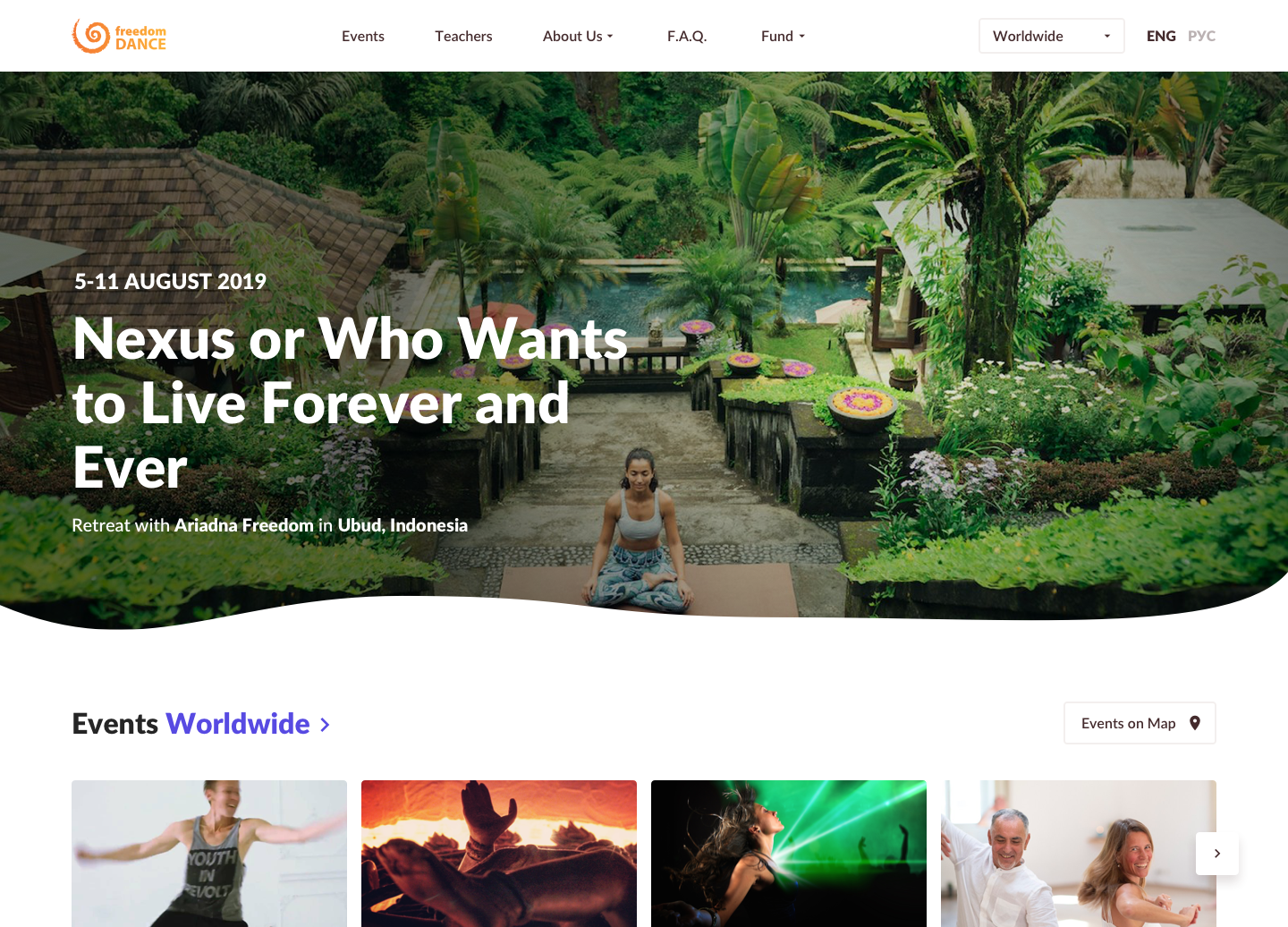
The start page features a prominent teaser for the main event of the year, presenting crucial details like date, location, event type, and the teacher's name. This setup aims to assist users in making informed decisions about participation.
A noteworthy feature is the ability for users to change their location on the page header, impacting the entire website. This selected location remains saved until the next change, enhancing the user's experience.
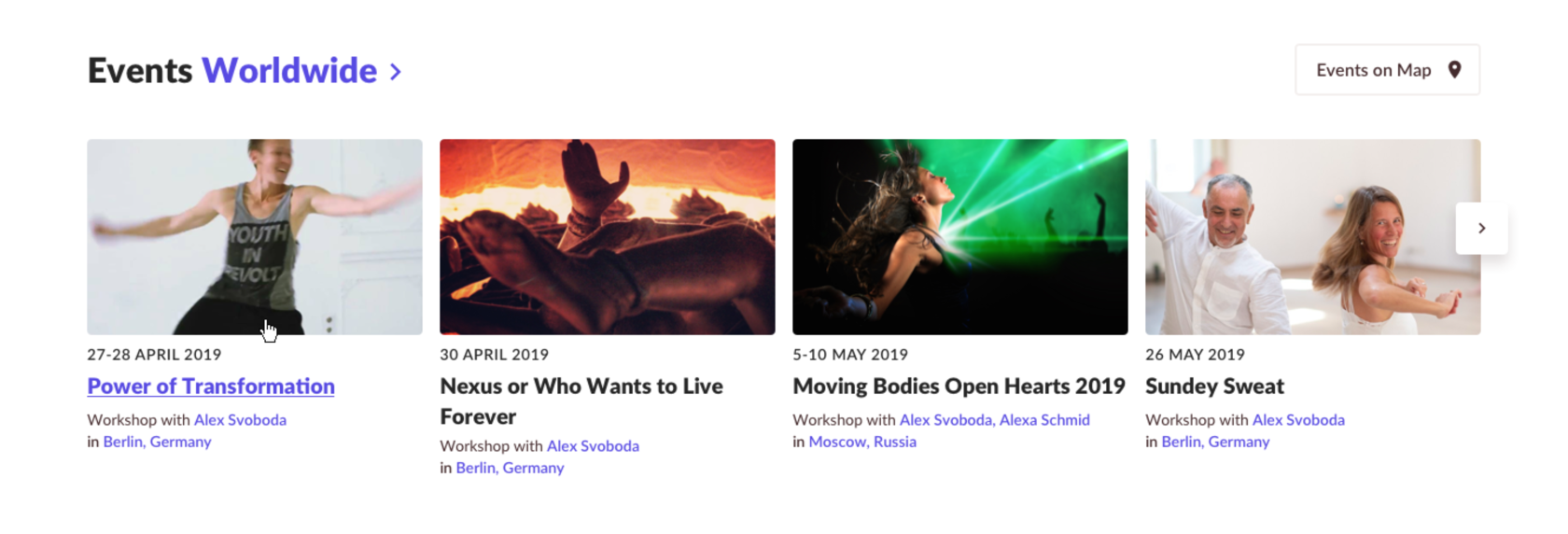
The carousel displays events sorted by date, allowing users to navigate to the events list by clicking on the city, country, or teacher. Depending on the user's choice, filters are applied—by teacher, country, or city.
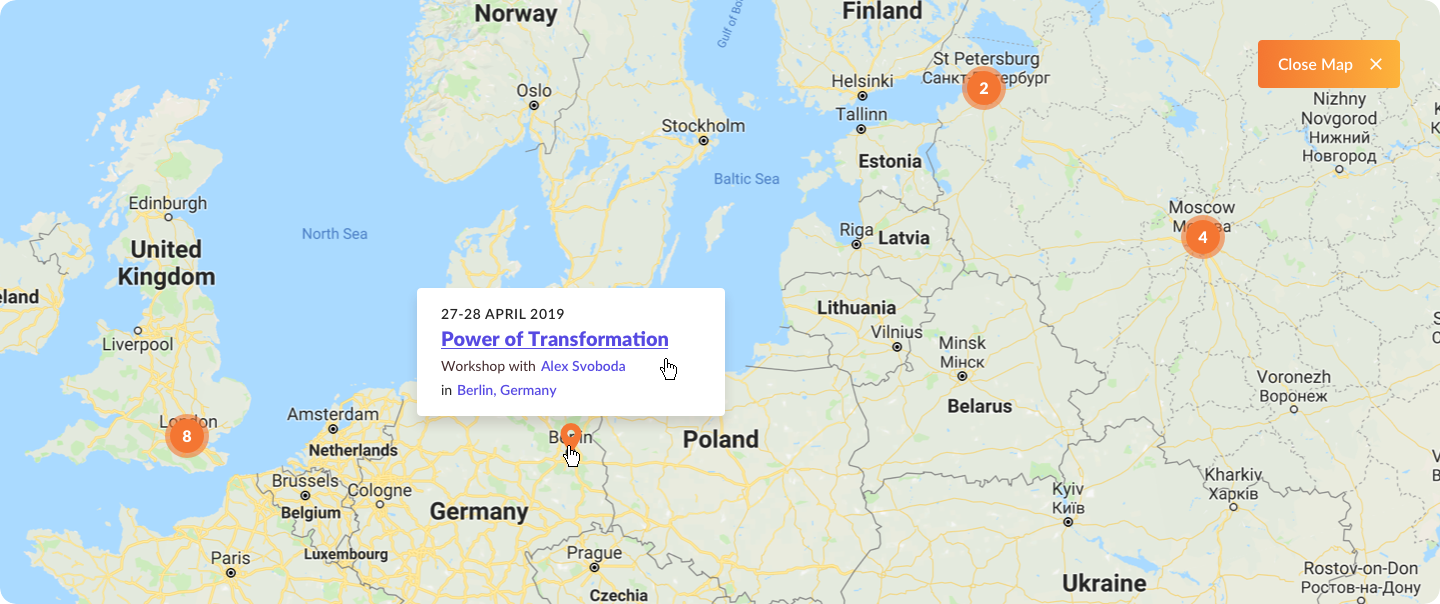
Additionally, users can explore all events on the map. If the selected region has a limited number of events, the system displays events in the country.
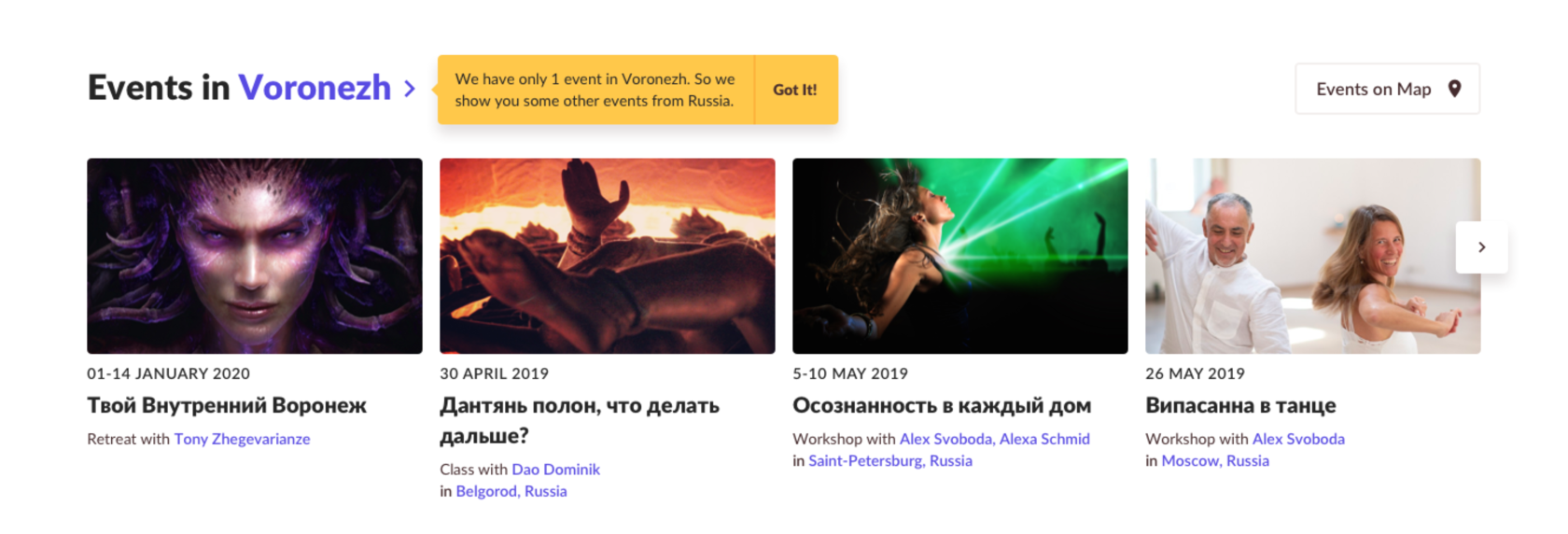
If quantity of events not so many in selected region we show events in the country then.
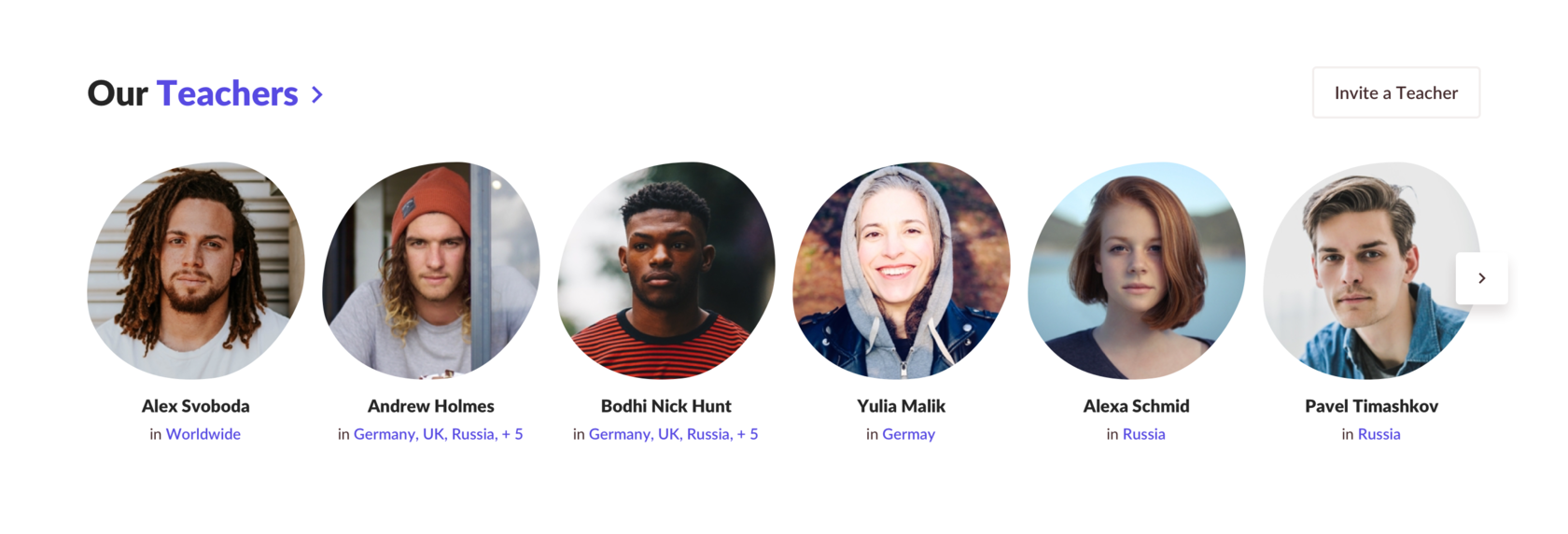
Teachers in the carousel are sorted by popularity, with the frequency of events indicating their popularity.
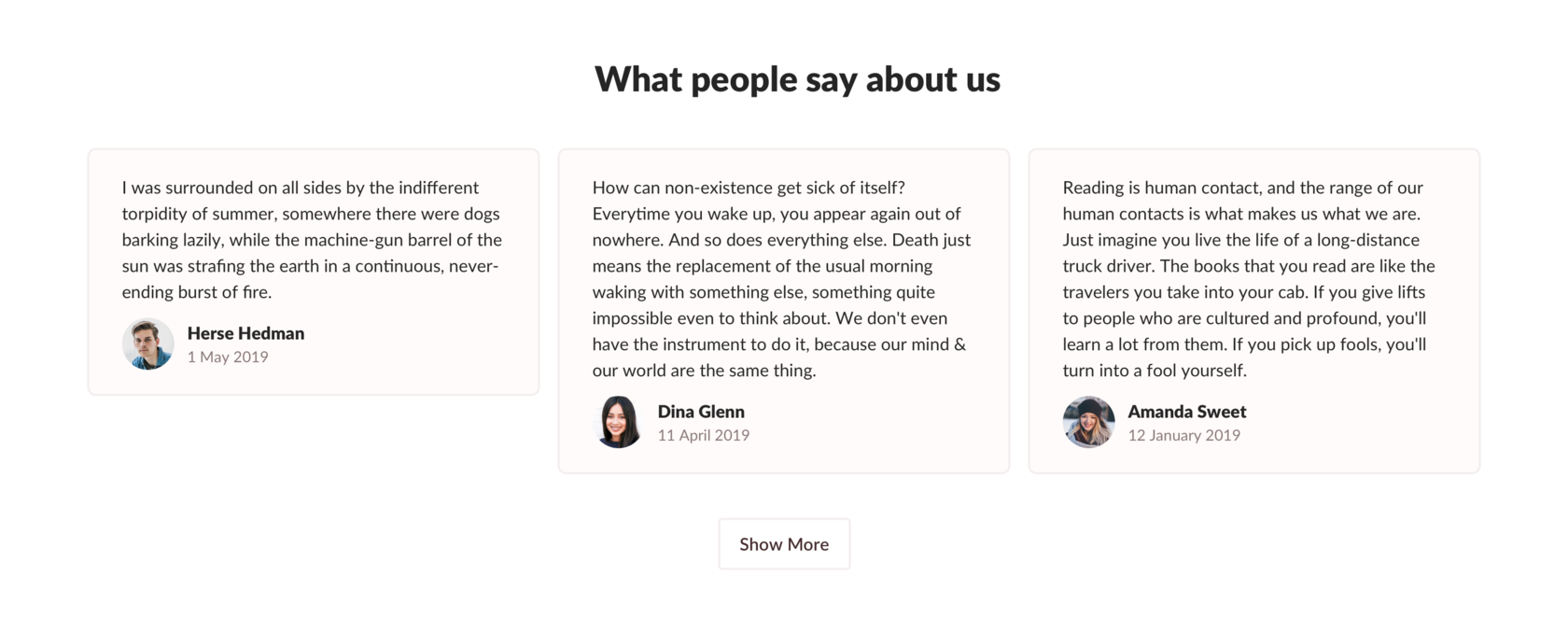
The testimonials section randomly showcases user feedback about teachers or events, with an option to view more testimonials.
Events
The list of events is the site's most visited page, where users find upcoming events, register, or purchase tickets.
Multi-line rows in the table enhance user convenience, making it easy to scan and identify when, where, and what type of events are taking place.
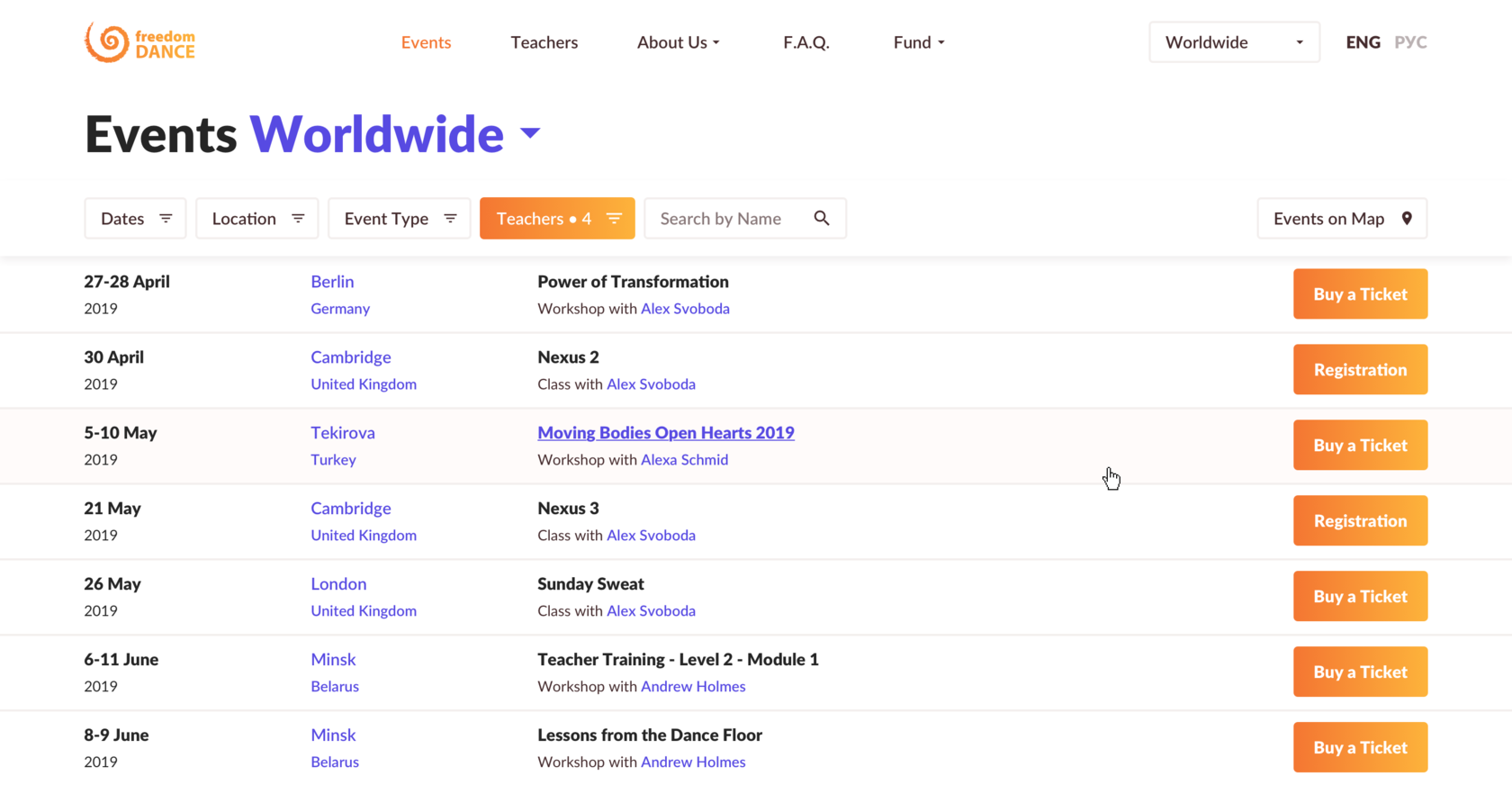
Filters at the top and clickable links (city, country, teacher) allow users to refine their search and buy tickets directly from the list, with payments processed through a third-party service.
Event details
The event details include a separate column highlighting crucial information: event location, date, and an option to add it to the calendar. Users can navigate to the teacher's page or contact the organizer for further details.
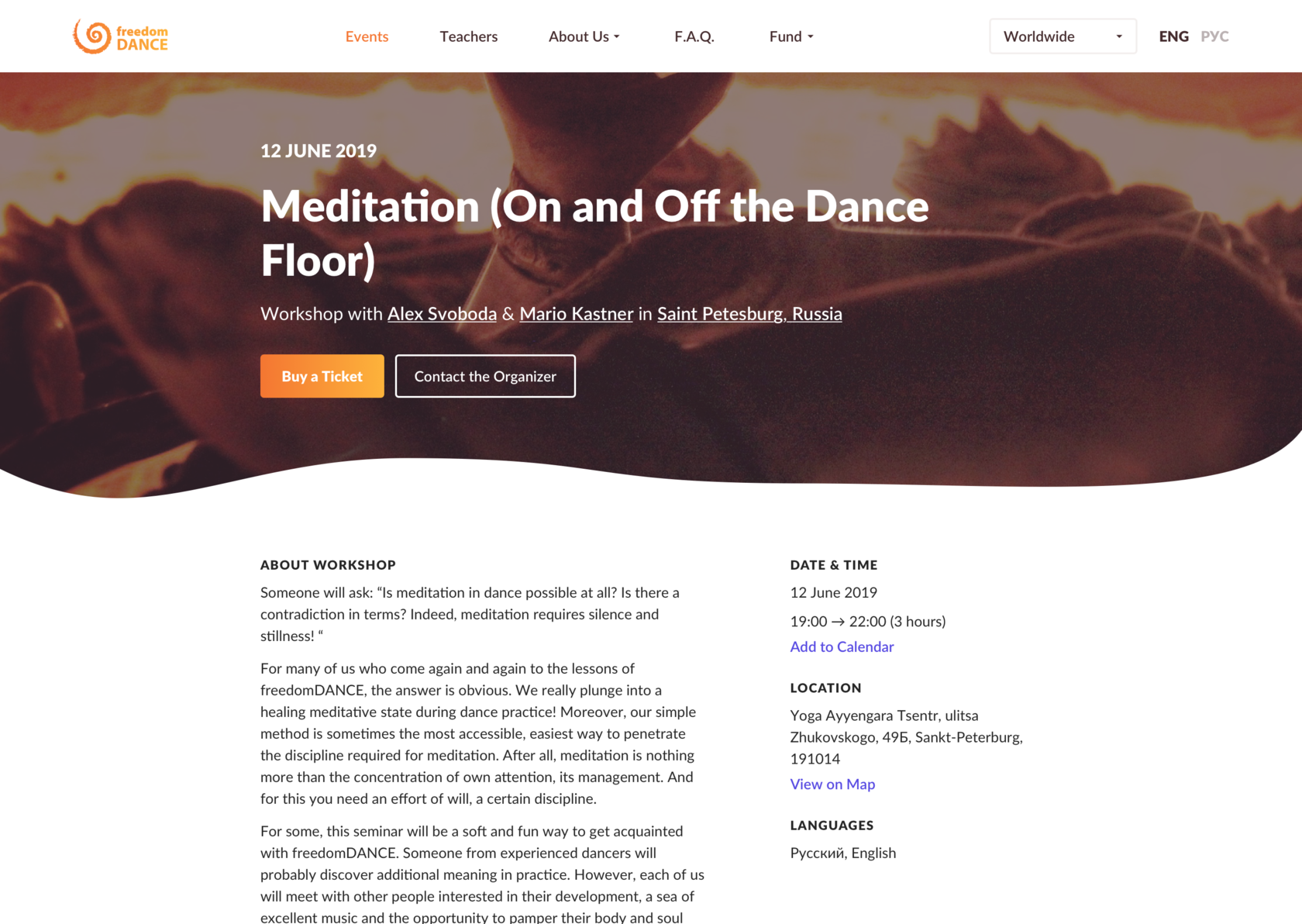

For events without pictures, default images with a kaleidoscope effect add variety and complement the project's spirit.
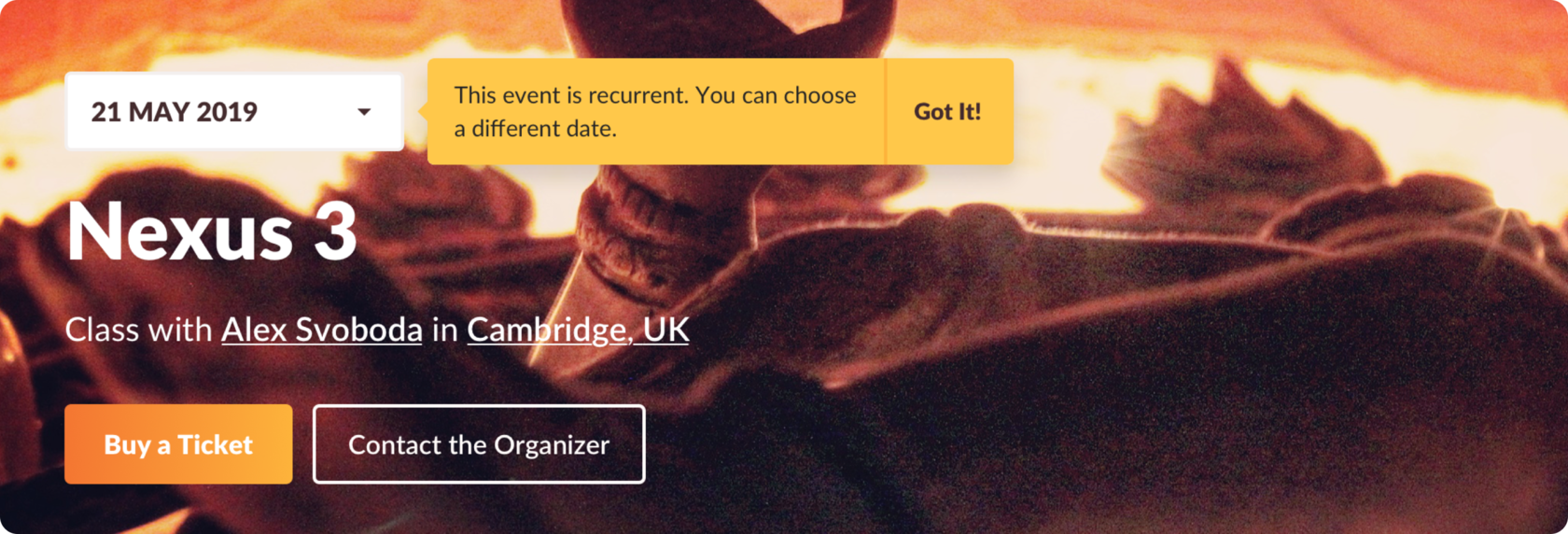
Some events recur weekly, monthly, or yearly, giving users the option to choose a specific date for participation or payment.
Teacher page
On a teacher's page, users can read about the teacher, view languages, subscribe to event updates, and, if they are event organizers, invite the teacher through a simple form.
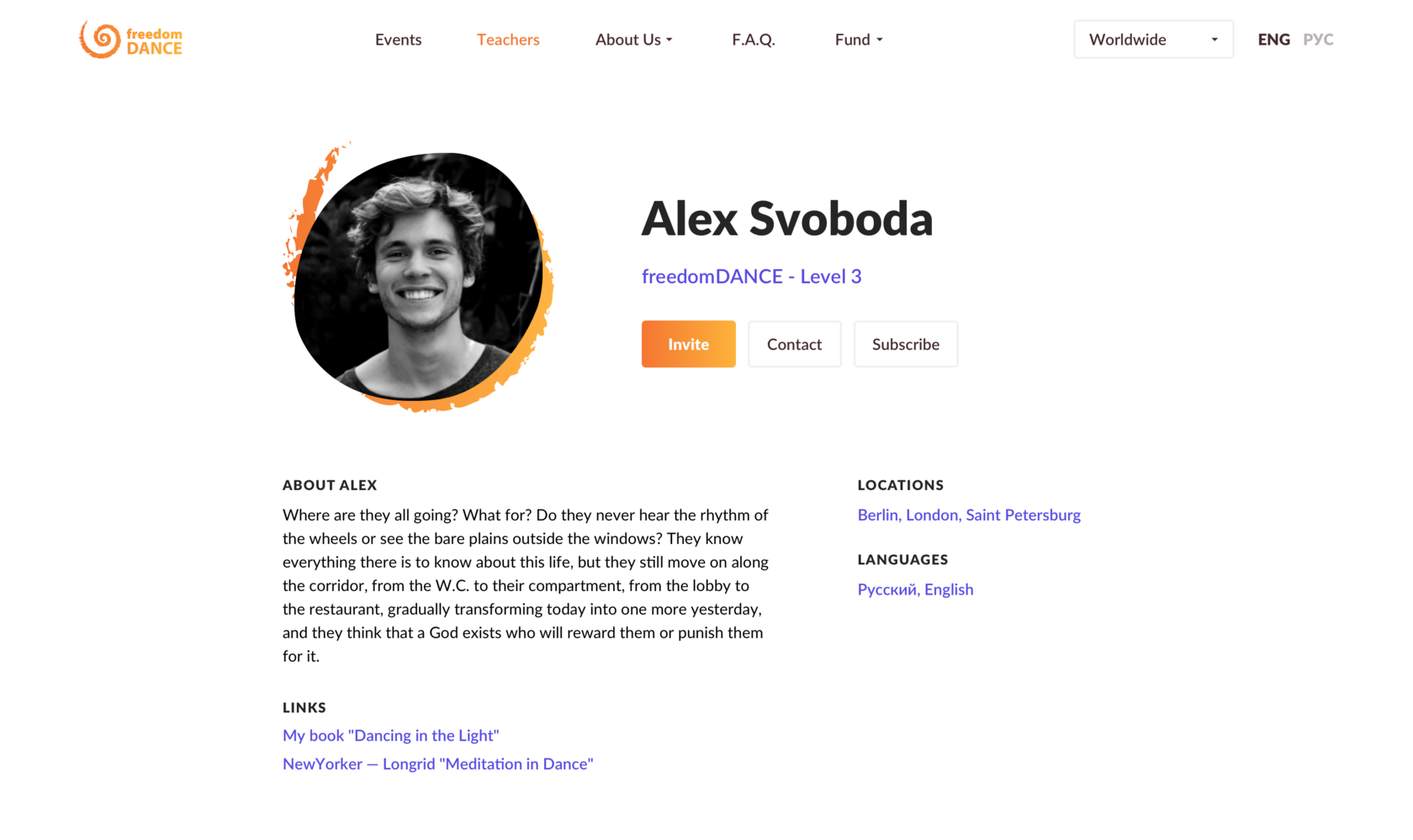
Each teacher's link section provides various links, such as event rules or articles.
Users can invite a teacher to their city and organize an event from multiple entry points, including the footer, teachers carousel, main menu, and the teacher's profile.
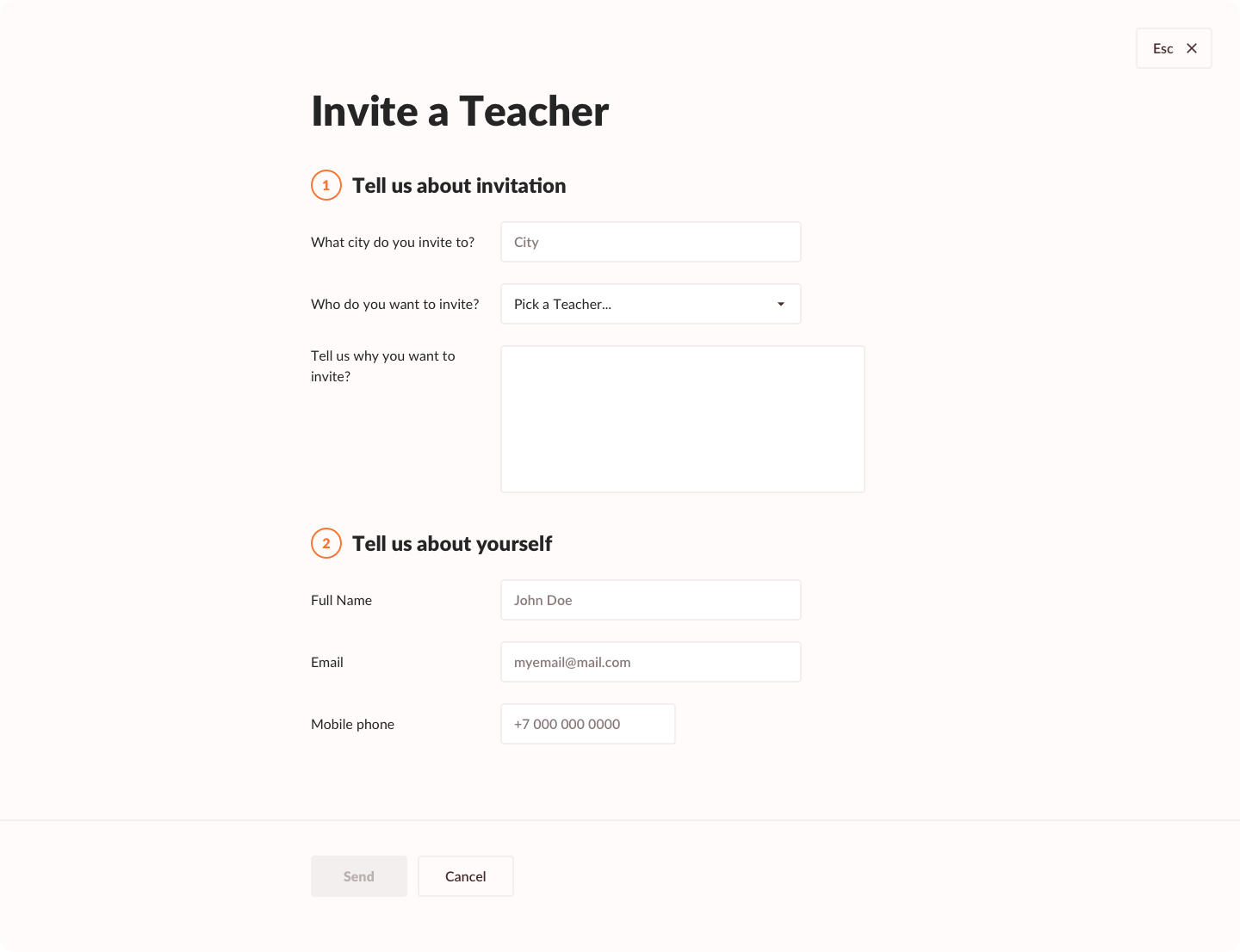
The organizer simply fills out a form to invite a teacher, with all contact details accessible in a pop-up by click.
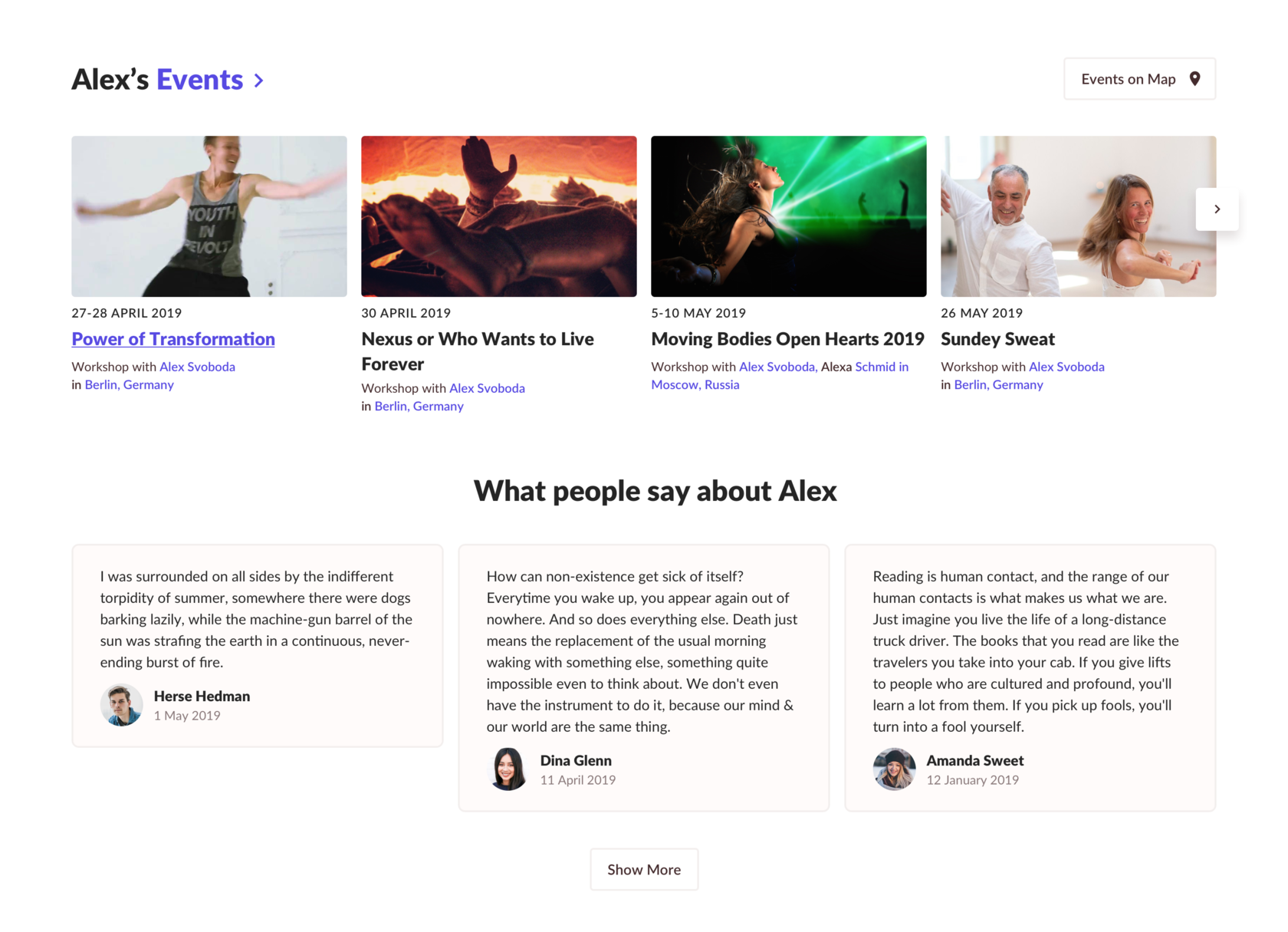
Following the teacher's bio, there is a gallery featuring the teacher's upcoming events. Users have the option to view them on a map or navigate to the complete list of the teacher's events.Additionally, users can peruse feedback from others about this specific teacher.
The Fund
A notable social aspect of the project is its fund, where anyone can contribute to support the development of the project.
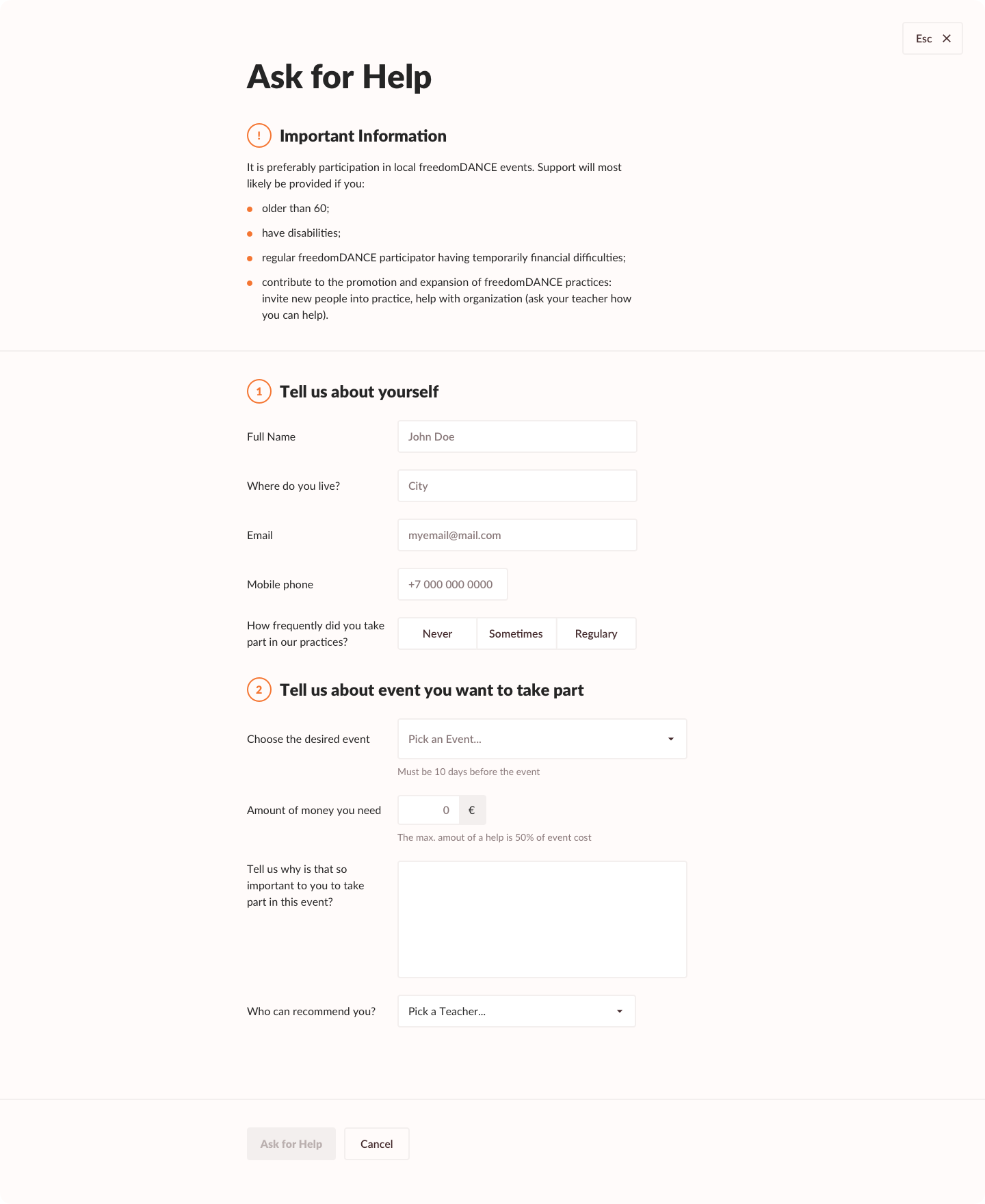
Individuals desiring to take classes but facing budget constraints can seek assistance from the fund. The application form has been streamlined for simplicity, ensuring that both the user and the application reviewer can quickly comprehend details such as the desired class, preferred teacher, and other relevant information.

Dance school website
Task and my role. My role involved creating a new website for the dance school. This included understanding basic user flows, designing UI layouts for both web and mobile views, and facilitating a smooth hand-off to developers.
Visit Project
About
Founded in 2009, freedomDANCE is an international dance meditation school and conscious movement community. With around 25 core teachers operating across Europe and beyond—including Austria, UK, Greece, Russia, Spain, Belarus, Turkey, and Ukraine—it offers everything from introductory classes to formal teacher certification through the International Conscious Movement Teachers Association (ICMTA)
The project's overarching theme is perpetual movement, echoing through the logo and incorporated metaphorically throughout the site's elements.
Main page
Given that users typically start by searching for events in their current region, the website caters to this need. Experienced users, on the other hand, may seek global events like retreats or festivals. Additionally, organizers might be looking for teachers to host events in their city or region.
The start page features a prominent teaser for the main event of the year, presenting crucial details like date, location, event type, and the teacher's name. This setup aims to assist users in making informed decisions about participation.
A noteworthy feature is the ability for users to change their location on the page header, impacting the entire website. This selected location remains saved until the next change, enhancing the user's experience.
The carousel displays events sorted by date, allowing users to navigate to the events list by clicking on the city, country, or teacher. Depending on the user's choice, filters are applied—by teacher, country, or city.
Additionally, users can explore all events on the map. If the selected region has a limited number of events, the system displays events in the country.
If quantity of events not so many in selected region we show events in the country then.
Teachers in the carousel are sorted by popularity, with the frequency of events indicating their popularity.
The testimonials section randomly showcases user feedback about teachers or events, with an option to view more testimonials.
Events
The list of events is the site's most visited page, where users find upcoming events, register, or purchase tickets.
Multi-line rows in the table enhance user convenience, making it easy to scan and identify when, where, and what type of events are taking place.
Filters at the top and clickable links (city, country, teacher) allow users to refine their search and buy tickets directly from the list, with payments processed through a third-party service.
Event details
The event details include a separate column highlighting crucial information: event location, date, and an option to add it to the calendar. Users can navigate to the teacher's page or contact the organizer for further details.
For events without pictures, default images with a kaleidoscope effect add variety and complement the project's spirit.
Some events recur weekly, monthly, or yearly, giving users the option to choose a specific date for participation or payment.
Teacher page
On a teacher's page, users can read about the teacher, view languages, subscribe to event updates, and, if they are event organizers, invite the teacher through a simple form.
Each teacher's link section provides various links, such as event rules or articles.
Users can invite a teacher to their city and organize an event from multiple entry points, including the footer, teachers carousel, main menu, and the teacher's profile.
The organizer simply fills out a form to invite a teacher, with all contact details accessible in a pop-up by click.
Following the teacher's bio, there is a gallery featuring the teacher's upcoming events. Users have the option to view them on a map or navigate to the complete list of the teacher's events.Additionally, users can peruse feedback from others about this specific teacher.
The Fund
A notable social aspect of the project is its fund, where anyone can contribute to support the development of the project.
Individuals desiring to take classes but facing budget constraints can seek assistance from the fund. The application form has been streamlined for simplicity, ensuring that both the user and the application reviewer can quickly comprehend details such as the desired class, preferred teacher, and other relevant information.
Dance school website
Task and my role. My role involved creating a new website for the dance school. This included understanding basic user flows, designing UI layouts for both web and mobile views, and facilitating a smooth hand-off to developers.
Visit Project
About
Founded in 2009, freedomDANCE is an international dance meditation school and conscious movement community. With around 25 core teachers operating across Europe and beyond—including Austria, UK, Greece, Russia, Spain, Belarus, Turkey, and Ukraine—it offers everything from introductory classes to formal teacher certification through the International Conscious Movement Teachers Association (ICMTA)
The project's overarching theme is perpetual movement, echoing through the logo and incorporated metaphorically throughout the site's elements.
Main page
Given that users typically start by searching for events in their current region, the website caters to this need. Experienced users, on the other hand, may seek global events like retreats or festivals. Additionally, organizers might be looking for teachers to host events in their city or region.
The start page features a prominent teaser for the main event of the year, presenting crucial details like date, location, event type, and the teacher's name. This setup aims to assist users in making informed decisions about participation.
A noteworthy feature is the ability for users to change their location on the page header, impacting the entire website. This selected location remains saved until the next change, enhancing the user's experience.
The carousel displays events sorted by date, allowing users to navigate to the events list by clicking on the city, country, or teacher. Depending on the user's choice, filters are applied—by teacher, country, or city.
Additionally, users can explore all events on the map. If the selected region has a limited number of events, the system displays events in the country.
If quantity of events not so many in selected region we show events in the country then.
Teachers in the carousel are sorted by popularity, with the frequency of events indicating their popularity.
The testimonials section randomly showcases user feedback about teachers or events, with an option to view more testimonials.
Events
The list of events is the site's most visited page, where users find upcoming events, register, or purchase tickets.
Multi-line rows in the table enhance user convenience, making it easy to scan and identify when, where, and what type of events are taking place.
Filters at the top and clickable links (city, country, teacher) allow users to refine their search and buy tickets directly from the list, with payments processed through a third-party service.
Event details
The event details include a separate column highlighting crucial information: event location, date, and an option to add it to the calendar. Users can navigate to the teacher's page or contact the organizer for further details.
For events without pictures, default images with a kaleidoscope effect add variety and complement the project's spirit.
Some events recur weekly, monthly, or yearly, giving users the option to choose a specific date for participation or payment.
Teacher page
On a teacher's page, users can read about the teacher, view languages, subscribe to event updates, and, if they are event organizers, invite the teacher through a simple form.
Each teacher's link section provides various links, such as event rules or articles.
Users can invite a teacher to their city and organize an event from multiple entry points, including the footer, teachers carousel, main menu, and the teacher's profile.
The organizer simply fills out a form to invite a teacher, with all contact details accessible in a pop-up by click.
Following the teacher's bio, there is a gallery featuring the teacher's upcoming events. Users have the option to view them on a map or navigate to the complete list of the teacher's events.Additionally, users can peruse feedback from others about this specific teacher.
The Fund
A notable social aspect of the project is its fund, where anyone can contribute to support the development of the project.
Individuals desiring to take classes but facing budget constraints can seek assistance from the fund. The application form has been streamlined for simplicity, ensuring that both the user and the application reviewer can quickly comprehend details such as the desired class, preferred teacher, and other relevant information.